GMP quality reports · Training guide
Change Control
Write the GMP change control record: the change and its reason, current and proposed states, an impact assessment across ten areas, a risk score, the US and EU regulatory route, actions with owners and dates, and the effectiveness check.
Open the tool at https://app.cmcfy.com/app/change-control.html. This guide is also online at https://cmcfy.com/guides/change-control.html
1. What this module does
You describe the change, assess its impact on quality, validation, methods, stability, equipment, computerised systems, documents, training, supply and safety, and score severity, occurrence and detectability. The tool classifies the change (minor, major, critical) from the risk score, or uses your own classification and flags it if it is lower than the score suggests.
It checks the regulatory route against whether registered details are affected, flags implementation before a prior approval or within 30 days of a CBE-30, and checks that every action has an owner and a date and that validation, training and stability actions exist where the impact calls for them.
What you get
- A Word or PDF record: Change control record, with sign-off lines for the initiator, department head, regulatory affairs and QA.
2. Before you start
Have these ready. You can still start with the example data and replace it piece by piece.
- The change number, title, description and reason, and the current and proposed state of each item.
- An impact assessment for each area, and the risk scores.
- The regulatory route agreed with Regulatory Affairs (the Post-approval Change Classifier module can suggest one).
- The actions with owners, due dates and status, the implementation date and the effectiveness check.
3. Step by step with the example
Open the tool at app.cmcfy.com/app/change-control.html. The example is loaded when the page opens, so every panel already has realistic data. Follow the steps to see how it works, then replace the example with your own data.
Describe the change
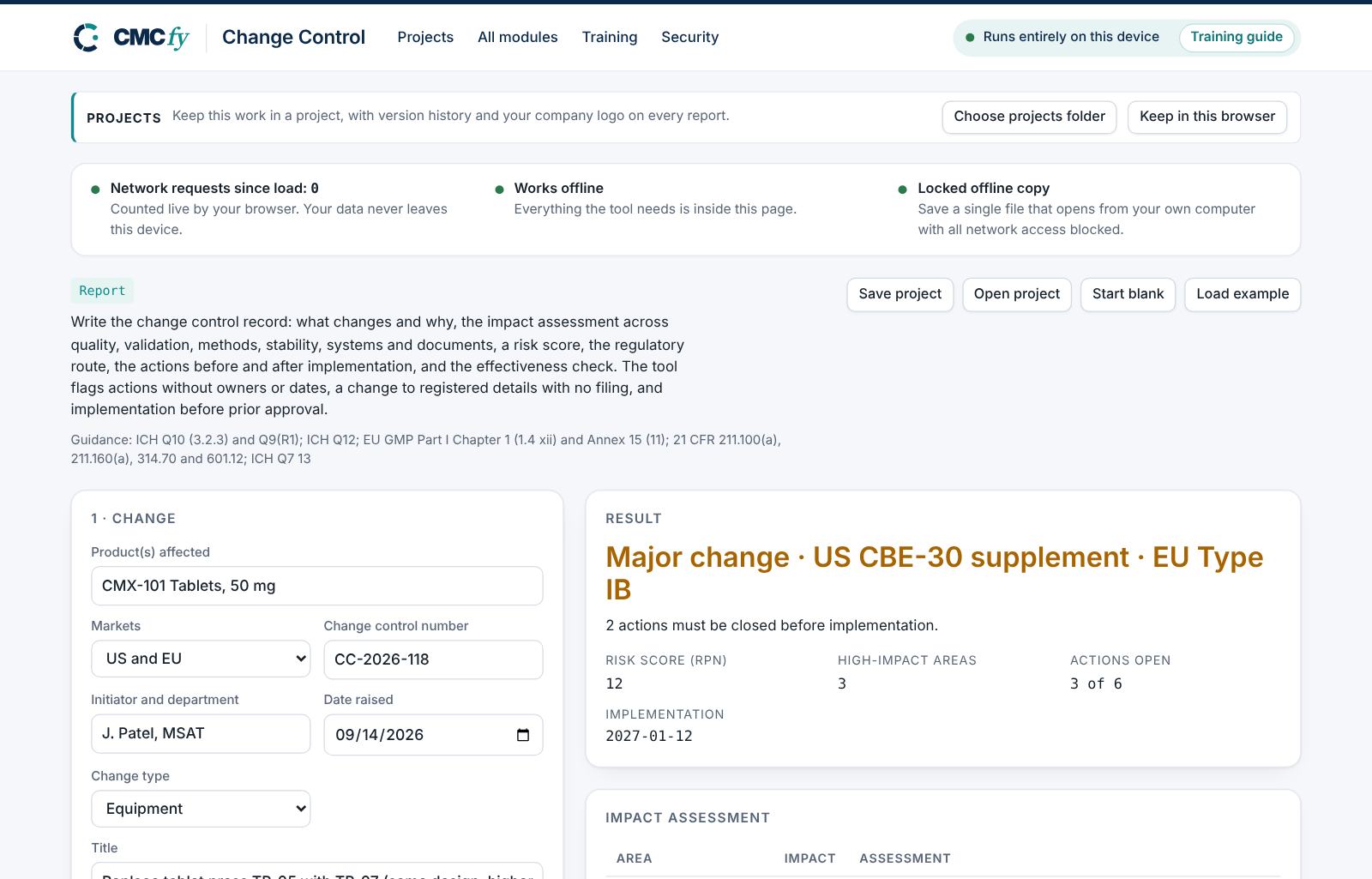
Enter the product, markets, change number, initiator, date, type and title. Describe what changes and why, and list each item as it is now and as proposed.
Assess the impact and the route
For each area give none, low or high with a short assessment. Say whether registered details are affected and choose the US and EU routes. Score severity, occurrence and detectability from 1 to 5.
Read the classification and actions
The headline gives the classification and route: "Major change · US CBE-30 supplement · EU Type IB". The tables show the impact by area and the actions with their status.
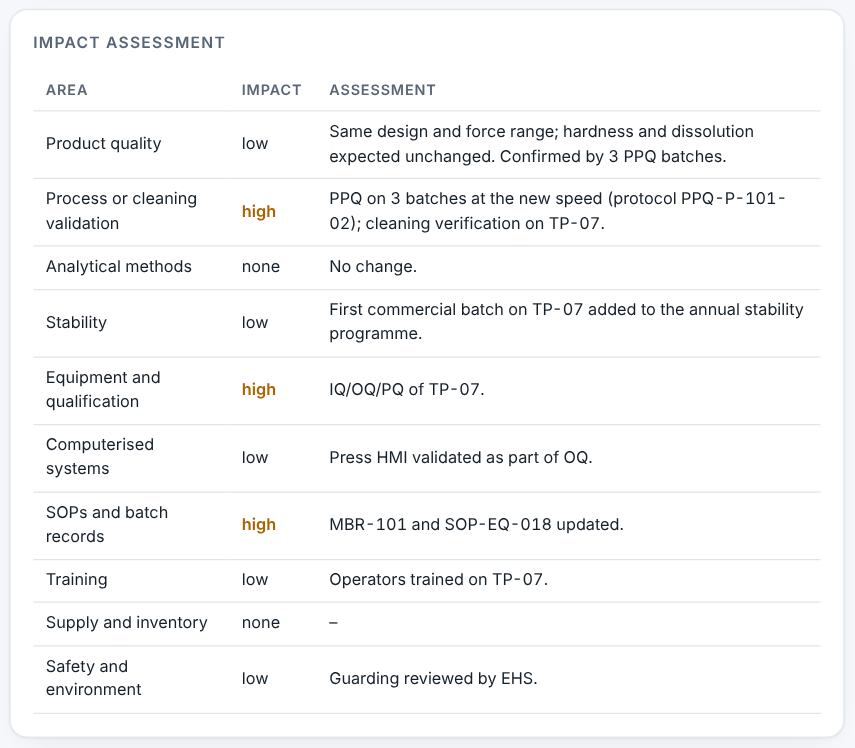
Impact assessment and actions. Resolve alerts and download
A registered change with no filing is critical. Missing owners or dates, open pre-implementation actions, implementation before approval and a missing effectiveness check are flagged. Then preview and download.
4. Field reference
Every input in the tool, panel by panel. Tables accept rows pasted straight from Excel, comma-separated text, or a loaded file; check the columns after loading a file. Fields marked “when it applies” appear only for the choices that need them.
1 · Change
| Field | What to enter |
|---|---|
| Product(s) affected | Type it in. |
| Markets | Choose one: US; EU; US and EU. |
| Change control number | Type it in. |
| Initiator and department | Type it in. |
| Date raised | Type it in. |
| Change type | Choose one: Manufacturing process; Equipment; Facility or utility; Specification; Analytical method; Supplier or material; Packaging; Site; Document only; Computerised system. |
| Title | Type it in. |
| Description and reason | Type or paste text. |
| Current and proposed | A table. Columns: Item | Current | Proposed. Paste rows from Excel, type comma-separated rows, or press Load file (Excel, CSV, Word, PDF or a scan). |
2 · Impact assessment
| Field | What to enter |
|---|---|
| Impact by area | Keep the area names as listed; the impact is none, low or high. A table. Columns: Area | Impact (none / low / high) | Assessment. Paste rows from Excel, type comma-separated rows, or press Load file (Excel, CSV, Word, PDF or a scan). |
| Registered details affected | Choose one: No; Yes; Not sure. |
| US regulatory route when it applies | Choose one: None (managed in the PQS); US annual report; US CBE-0 supplement; US CBE-30 supplement; US prior approval supplement; To be decided by Regulatory Affairs. |
| EU regulatory route when it applies | Choose one: None (managed in the PQS); EU Type IA; EU Type IA_IN; EU Type IB; EU Type II; To be decided by Regulatory Affairs. |
| Regulatory assessment | Type or paste text. |
| Severity (1–5) | Type a number. |
| Occurrence (1–5) | Type a number. |
| Detectability (1–5; 5 = hard to detect) | Type a number. |
| Classification | Choose one: From the risk score; Minor; Major; Critical. |
3 · Actions and approval
| Field | What to enter |
|---|---|
| Actions | Mark actions that must be closed before the change is implemented with "yes" in the fourth column. A table. Columns: Action | Owner | Due date | Before implementation (yes/no) | Status (open / done). Paste rows from Excel, type comma-separated rows, or press Load file (Excel, CSV, Word, PDF or a scan). |
| Planned implementation date | Type it in. |
| Regulatory approval date (optional; prior approval only) | Only needed for a prior approval supplement or an EU Type II variation. Type it in. |
| Effectiveness check | Type or paste text. |
| QA approver | Type it in. |
5. Checks and alerts
Calculations and pass/fail outcomes always come from fixed rules, never from AI. The tool checks:
- Description, reason and current and proposed states present.
- Every impact area assessed; high impact explained.
- Risk priority number (severity × occurrence × detectability); a classification lower than the score suggests is flagged.
- Registered details affected with no filing (critical); route not decided; implementation before prior approval or within 30 days of a CBE-30 submission.
- Actions with owners and due dates; overdue actions; validation, training and stability actions where the impact needs them.
- Effectiveness check for non-minor changes; QA approver named.
How to resolve alerts
- Critical alerts block the download and must be fixed in the data. A failing result can instead be linked to an investigation: type the investigation reference and outcome and press Record.
- Major alerts block the download until you fix them or type a justification and press Accept justification.
- Minor alerts do not block anything. They are listed in the documents so the reviewer sees them.
- Some alerts have an Apply fix button that makes the change for you. Reopen undoes a justification.
Narratives
This module writes: Change summary and justification. Each narrative is written by fixed rules from your data. You can edit it in the box. Rewrite with AI (where your plan includes AI) rewrites it in regulatory style; every number in the text is checked against your data, and a number that does not match is flagged under the box and blocks the download until you correct it. Reset to rule-based text brings back the original.
6. Preview, gap review and download
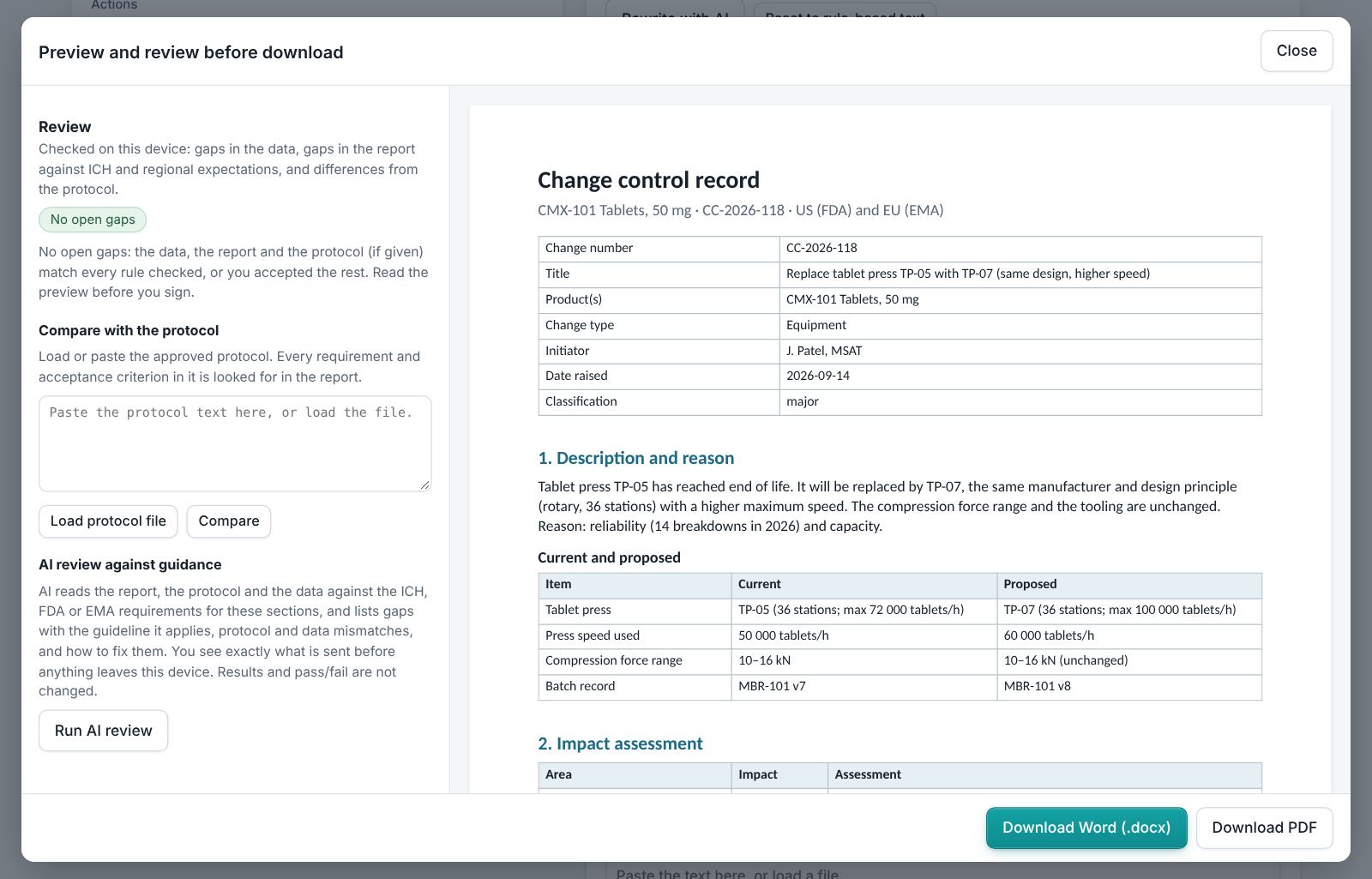
- Press Preview next to a section, or Preview and download all. The document opens in a preview window, exactly as the Word file will read.
- The left side lists the review, run on your device: gaps in the data (missing values, open alerts), gaps in the report (missing content the guidance expects, placeholders such as [site] or TBD left in the text) and, if you load the approved protocol under Compare with the protocol, differences from the protocol (requirements, criteria, batches or time points it plans that the report does not show).
- Click a finding to jump to the place in the preview. Fix it in the tool, then preview again.
- Optional AI review: a second read for contradictions, claims without data and vague wording. The report text is sent to Claude only when you press it, and only where your plan includes AI. Check every AI finding; AI can be wrong.
- Press Download Word (.docx) or Download PDF. With several documents open, All as Word (.zip) and All as PDF (.zip) download the set. The download buttons stay disabled while a blocking alert is open; the preview still works.
Documents this module produces
| Section | Document |
|---|---|
| Report | Change control record |
Use Save project to keep your work as a file on your computer, and Open project to continue later. Start blank clears every field; Load example brings the example back. Nothing is stored on CMCfy servers.
7. US and EU submissions
Choose US, EU or both. The US route options are annual report, CBE-0, CBE-30 and prior approval supplement (21 CFR 314.70 or 601.12); the EU options are Type IA, IA_IN, IB and II (Regulation (EC) No 1234/2008). Changes not affecting registered details are managed in the PQS (ICH Q12).
8. Working with other modules
- Get a suggested route for each change from the Post-approval Change Classifier module.
- Validation actions are reported in the Process Validation Report or Cleaning Validation Report module.
- Changes are reviewed in the Annual Product Review.
9. Common pitfalls
- Marking an area "none" without a reason when it is not obviously unaffected.
- Setting the implementation date before the regulatory approval date.
- Leaving the effectiveness check for later: define it when the change is approved.
10. Practice exercises
Each exercise starts from the example (press Load example to reset). We run these on every update of this guide, so the result you see should match.
Plan no filing for a registered change
Set Markets to US and US regulatory route to None.
Expected resultA critical alert says the change affects registered details but no filing is planned.
Raise the risk
Set Occurrence to 5 and Detectability to 4.
Expected resultThe headline says the change is critical.