GMP quality reports · Training guide
Complaint Trending & Recall Report
Write the periodic complaint report and the recall decision: complaints by category and batch, closure times, root causes, repeat complaints, and for critical defects the health hazard evaluation, recall class and notifications.
Open the tool at https://app.cmcfy.com/app/complaints-recalls.html. This guide is also online at https://cmcfy.com/guides/complaints-recalls.html
1. What this module does
You enter each complaint with its batch, description, category, severity, root cause, CAPA and closure date. The tool trends them by category and batch and calculates the rate per million units.
It flags critical defects without a recall decision, repeat complaints, late closures, missing root causes and adverse events not referred to pharmacovigilance.
What you get
- A Word or PDF report: Complaint trending and recall report.
2. Before you start
Have these ready. You can still start with the example data and replace it piece by piece.
- The complaints received in the period.
- Units distributed.
- The health hazard evaluation for any critical defect.
3. Step by step with the example
Open the tool at app.cmcfy.com/app/complaints-recalls.html. The example is loaded when the page opens, so every panel already has realistic data. Follow the steps to see how it works, then replace the example with your own data.
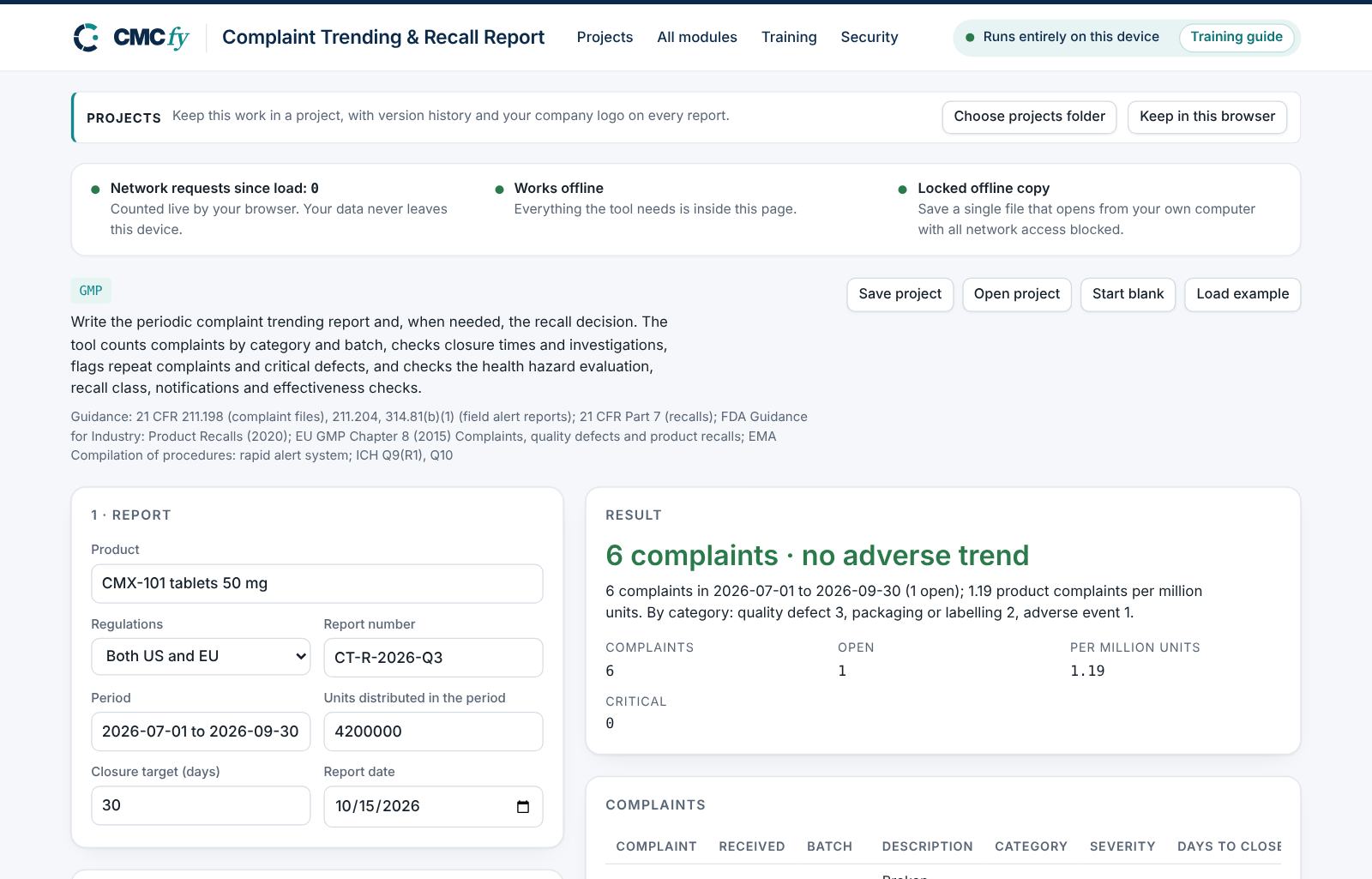
Describe the period
Enter the product, the period, the units distributed and the closure target.
Enter the complaints
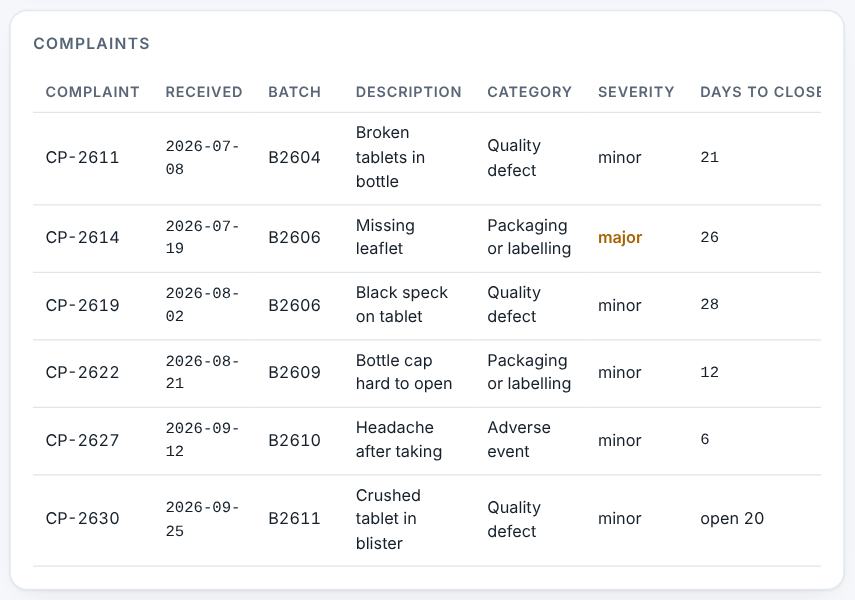
One row per complaint. Leave the closed date empty while it is open.
Read the result
The headline gives the trend: "6 complaints · no adverse trend".
Complaints and closure. Resolve alerts and download
A critical defect without a recall decision is critical. Repeat complaints and missing root causes are major. Then preview and download.
4. Field reference
Every input in the tool, panel by panel. Tables accept rows pasted straight from Excel, comma-separated text, or a loaded file; check the columns after loading a file. Fields marked “when it applies” appear only for the choices that need them.
1 · Report
| Field | What to enter |
|---|---|
| Product | Type it in. |
| Regulations | Choose one: US: 21 CFR 211.198, Part 7; EU: EU GMP Chapter 8; Both US and EU. |
| Report number | Type it in. |
| Period | Type it in. |
| Units distributed in the period | Type a number. |
| Closure target (days) | Type a number. |
| Report date | Type it in. |
2 · Complaints
One row per complaint. Severity: critical, major or minor.
| Field | What to enter |
|---|---|
| Complaints | A table. Columns: Complaint | Received | Batch | Description | Category | Severity | Root cause | CAPA | Closed. Paste rows from Excel, type comma-separated rows, or press Load file (Excel, CSV, Word, PDF or a scan). |
3 · Recall decision
| Field | What to enter |
|---|---|
| Recall | Choose one: No recall needed; Recall initiated. |
| Health hazard evaluation | Name each critical complaint (for example CP-2611) in the health hazard evaluation. Type or paste text. |
| Recall class when it applies | Choose one: Class I / 1; Class II / 2; Class III / 3. |
| Recall depth when it applies | Choose one: Wholesale; Retail (pharmacy); Patient level. |
| Authorities notified (FDA field alert / district; EU rapid alert / competent authority) when it applies | Tick the box if it applies. |
| Effectiveness checks (level and result) when it applies | Type or paste text. |
5. Checks and alerts
Calculations and pass/fail outcomes always come from fixed rules, never from AI. The tool checks:
- Trend by category and batch.
- Closure time and root cause.
- Recall decision, class, notifications and effectiveness checks.
How to resolve alerts
- Critical alerts block the download and must be fixed in the data. A failing result can instead be linked to an investigation: type the investigation reference and outcome and press Record.
- Major alerts block the download until you fix them or type a justification and press Accept justification.
- Minor alerts do not block anything. They are listed in the documents so the reviewer sees them.
- Some alerts have an Apply fix button that makes the change for you. Reopen undoes a justification.
Narratives
This module writes: Trend evaluation and conclusion. Each narrative is written by fixed rules from your data. You can edit it in the box. Rewrite with AI (where your plan includes AI) rewrites it in regulatory style; every number in the text is checked against your data, and a number that does not match is flagged under the box and blocks the download until you correct it. Reset to rule-based text brings back the original.
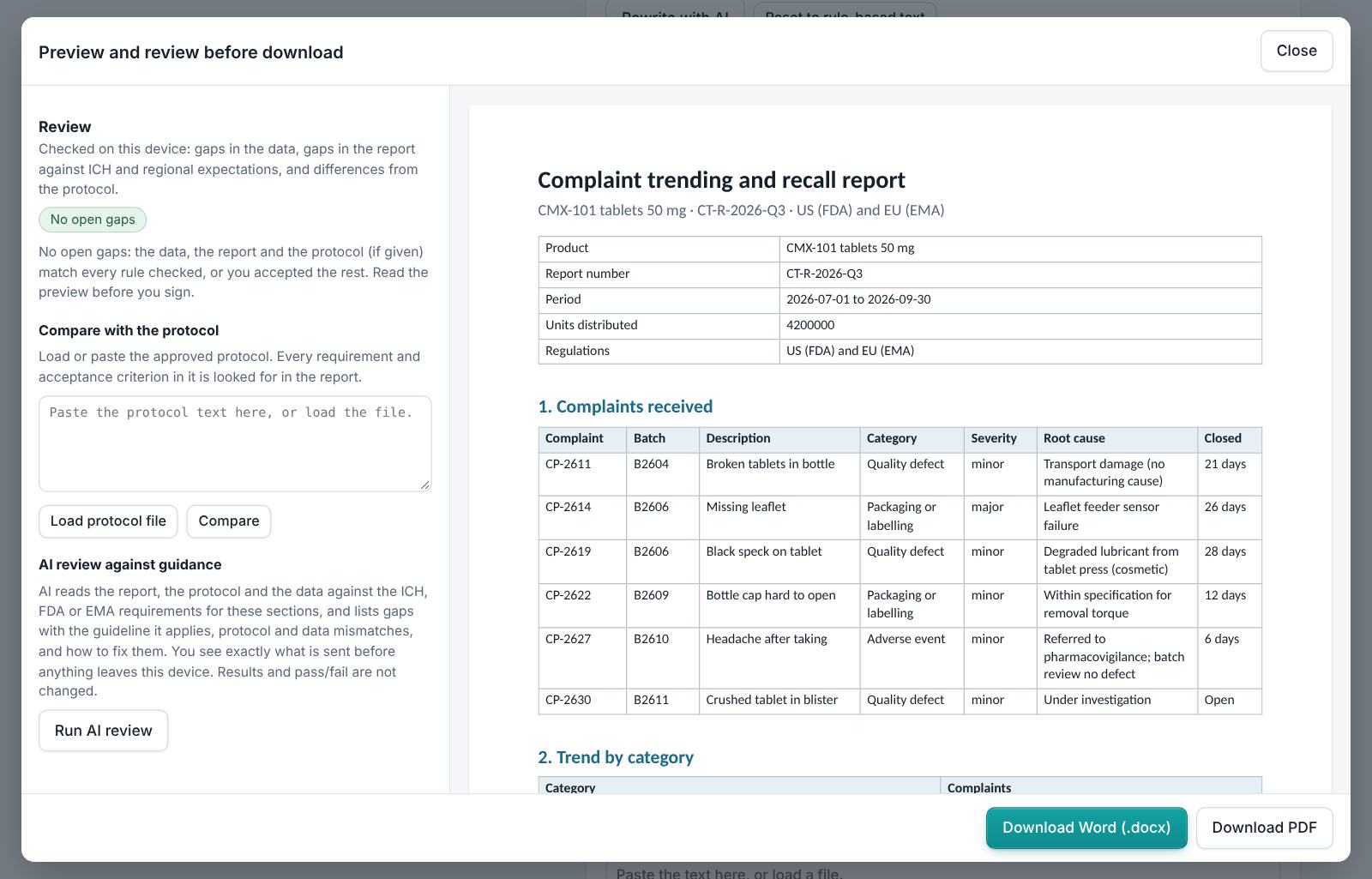
6. Preview, gap review and download
- Press Preview next to a section, or Preview and download all. The document opens in a preview window, exactly as the Word file will read.
- The left side lists the review, run on your device: gaps in the data (missing values, open alerts), gaps in the report (missing content the guidance expects, placeholders such as [site] or TBD left in the text) and, if you load the approved protocol under Compare with the protocol, differences from the protocol (requirements, criteria, batches or time points it plans that the report does not show).
- Click a finding to jump to the place in the preview. Fix it in the tool, then preview again.
- Optional AI review: a second read for contradictions, claims without data and vague wording. The report text is sent to Claude only when you press it, and only where your plan includes AI. Check every AI finding; AI can be wrong.
- Press Download Word (.docx) or Download PDF. With several documents open, All as Word (.zip) and All as PDF (.zip) download the set. The download buttons stay disabled while a blocking alert is open; the preview still works.
Documents this module produces
| Section | Document |
|---|---|
| Report | Complaint trending and recall report |
Use Save project to keep your work as a file on your computer, and Open project to continue later. Start blank clears every field; Load example brings the example back. Nothing is stored on CMCfy servers.
7. US and EU submissions
US follows 21 CFR 211.198, field alert reports (314.81) and Part 7 recalls. EU follows EU GMP Chapter 8 and the rapid alert system.
8. Working with other modules
- Complaints are investigated in the Investigation Studio (OOS, deviation, CAPA) and summarised in the Annual Product Review.
9. Common pitfalls
- Closing complaints without a root cause.
- Missing a repeat complaint on the same batch.
10. Practice exercises
Each exercise starts from the example (press Load example to reset). We run these on every update of this guide, so the result you see should match.
Escalate a complaint
Change complaint CP-2611 from minor to critical.
Expected resultThe headline shows one critical defect needing a recall decision.