Module 3 sections · Training guide
Excipients Writer
Write the control of excipients: specifications and procedures for non-compendial excipients, justification, excipients of human or animal origin, and the full data set for a novel excipient (3.2.A.3).
Open the tool at https://app.cmcfy.com/app/excipients.html. This guide is also online at https://cmcfy.com/guides/excipients.html
1. What this module does
Compendial excipients are controlled by their monograph, but anything else needs its own specification, procedures, validation and justification (3.2.P.4.1 to 4.4). Excipients of human or animal origin need TSE and viral safety information (3.2.P.4.5), and a novel excipient needs a full data package (3.2.P.4.6 and 3.2.A.3).
The tool checks pharmacopoeia references for the region, TSE status, colourants such as titanium dioxide, and functionality-related characteristics of common excipients.
What you get
- Word or PDF files for 3.2.P.4.1 to 3.2.P.4.6 and 3.2.A.3.
- A summary file for the QOS Composer & Dossier Assembler.
2. Before you start
Have these ready. You can still start with the example data and replace it piece by piece.
- Each excipient: function, quality standard (USP-NF, Ph. Eur., JP or in-house), supplier and grade, origin and whether it is novel.
- Tests, methods and acceptance criteria for in-house excipients, how the methods were validated and why the criteria are right.
- For a novel excipient: manufacturer and process, characterisation, stability, safety data and the regulatory route (DMF or full data).
- Statements on residual solvents, elemental impurities and nitrite in excipients.
3. Step by step with the example
Open the tool at app.cmcfy.com/app/excipients.html. The example is loaded when the page opens, so every panel already has realistic data. Follow the steps to see how it works, then replace the example with your own data.
List the excipients
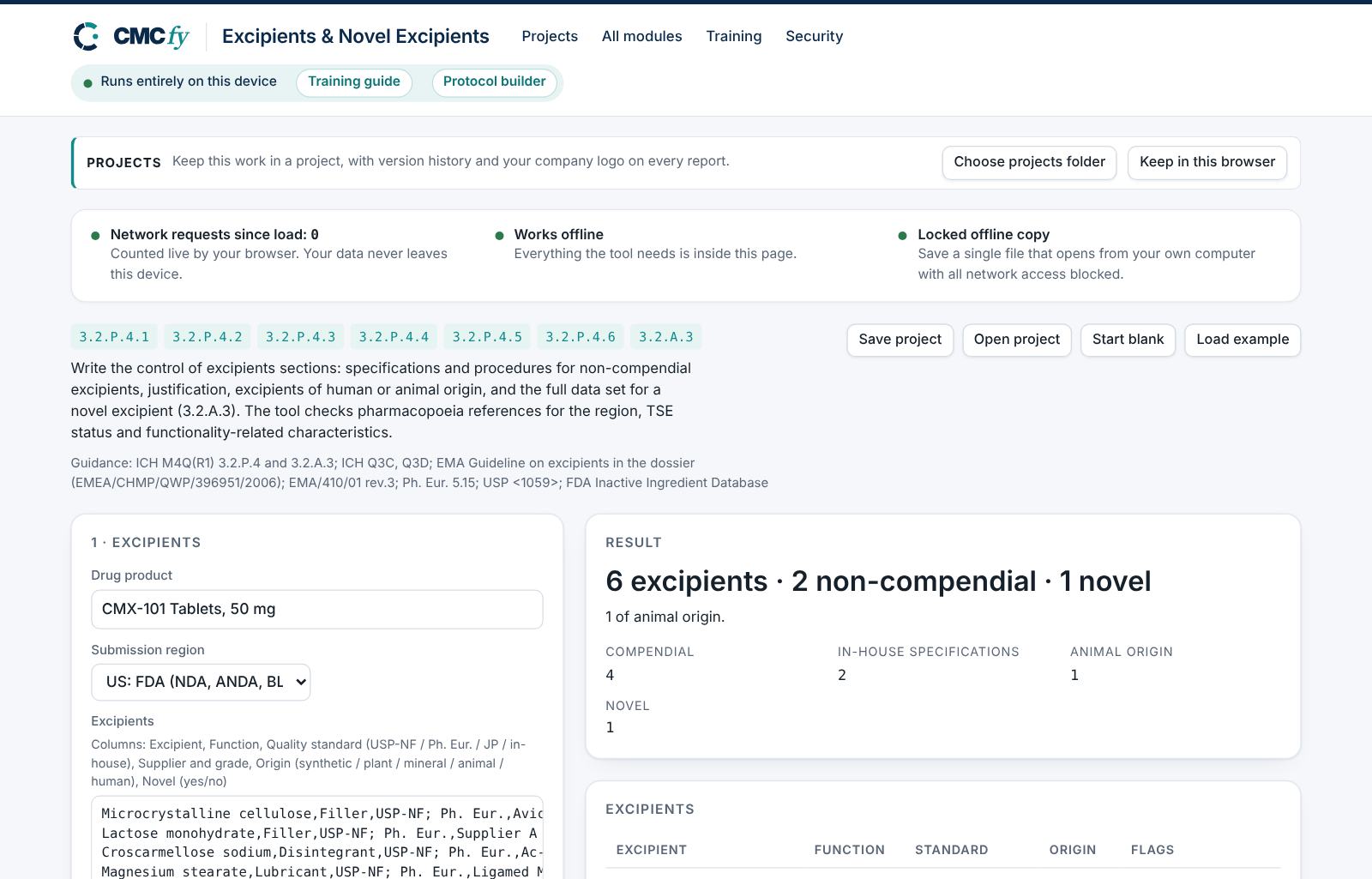
Enter one row per excipient. Write the quality standard as you will cite it (for example "USP-NF; Ph. Eur."), and "In-house" for anything without a monograph. The headline counts them: 6 excipients, 2 non-compendial, 1 novel, 1 of animal origin.
Write the statements
The statements box covers all excipients: functionality-related characteristics, residual solvents (Q3C), elemental impurities (Q3D), nitrite and TSE. Missing topics raise minor alerts.
Specify the in-house excipients
For each non-compendial excipient enter its tests, methods and criteria, then how the methods were validated and why the criteria are justified.
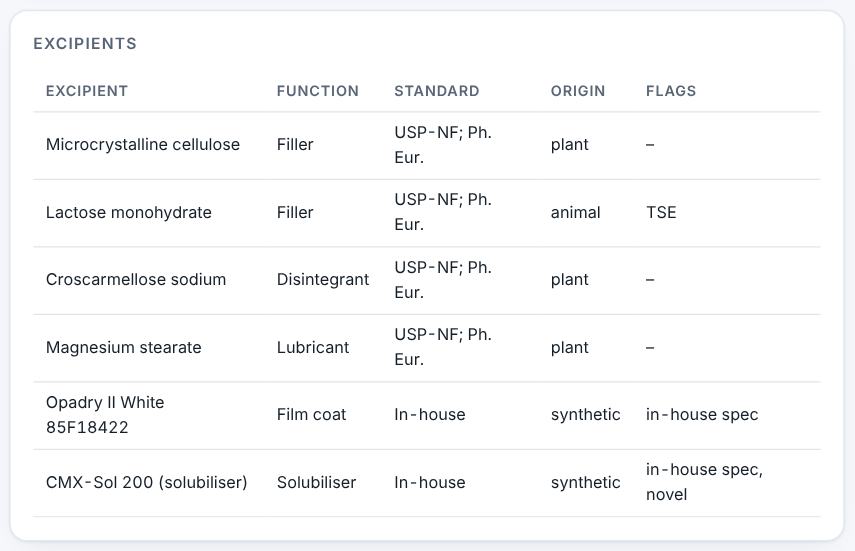
Excipients with their standard and origin. Complete the novel excipient
Panel 3 collects the novel excipient package. Each empty field raises a major alert, because 3.2.A.3 needs all of it.
Preview and download
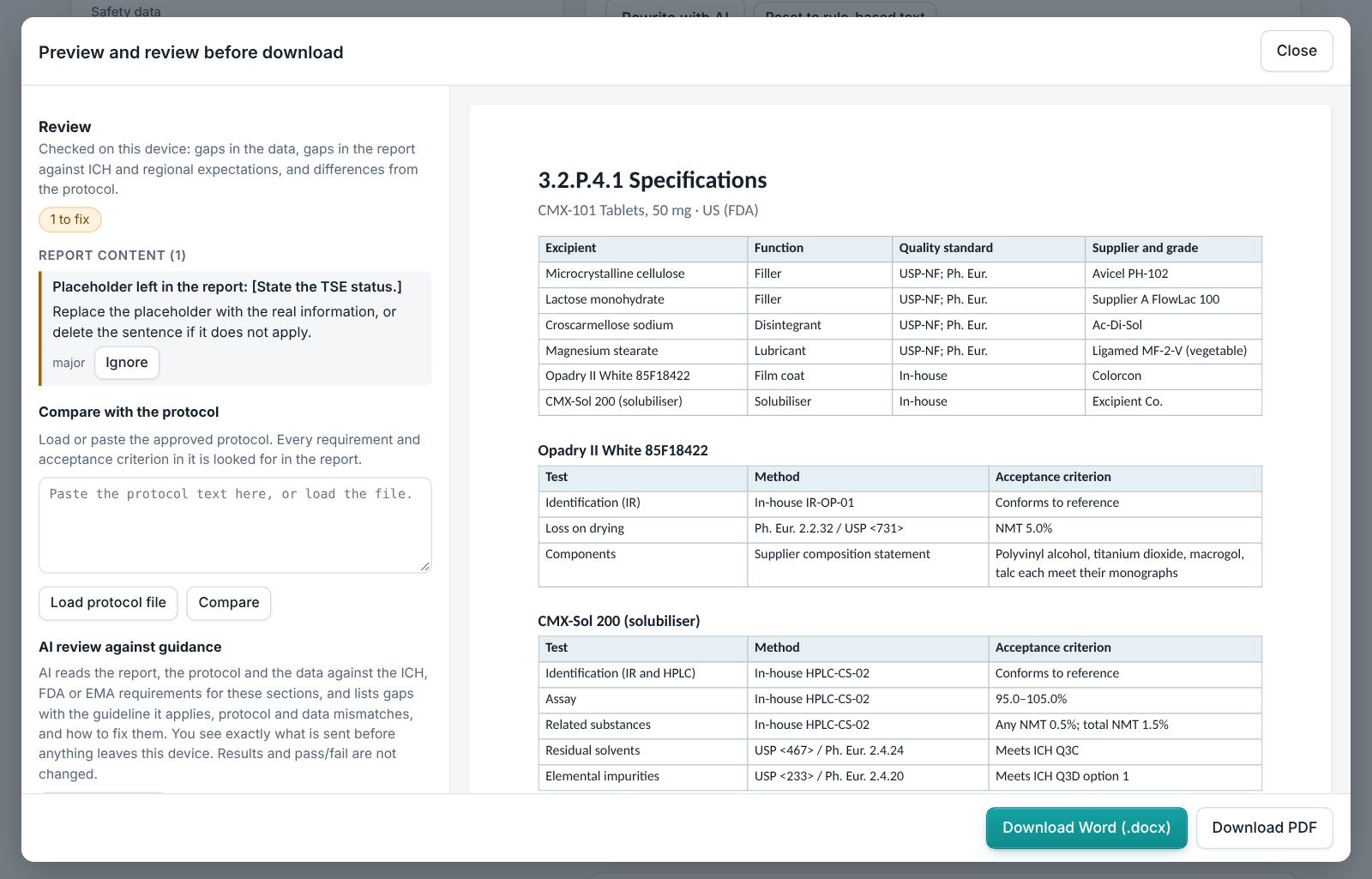
The example has no alerts. Preview each 3.2.P.4 section and 3.2.A.3, read the review and download.
4. Field reference
Every input in the tool, panel by panel. Tables accept rows pasted straight from Excel, comma-separated text, or a loaded file; check the columns after loading a file. Fields marked “when it applies” appear only for the choices that need them.
1 · Excipients
| Field | What to enter |
|---|---|
| Drug product | Type it in. |
| Submission region | Choose one: US: FDA (NDA, ANDA, BLA, IND); EU: EMA and national agencies (MAA); Both US and EU. |
| Excipients | A table. Columns: Excipient | Function | Quality standard (USP-NF / Ph. Eur. / JP / in-house) | Supplier and grade | Origin (synthetic / plant / mineral / animal / human) | Novel (yes/no). Paste rows from Excel, type comma-separated rows, or press Load file (Excel, CSV, Word, PDF or a scan). |
| Statements covering all excipients | Type or paste text. |
2 · Non-compendial excipient specifications (3.2.P.4.1–4.4)
| Field | What to enter |
|---|---|
| Tests | A table. Columns: Excipient | Test | Method | Acceptance criterion. Paste rows from Excel, type comma-separated rows, or press Load file (Excel, CSV, Word, PDF or a scan). |
| Validation of in-house procedures | Type it in. |
| Justification of the specifications | Type it in. |
3 · Novel excipient (3.2.P.4.6 and 3.2.A.3)
A novel excipient is one used for the first time in a drug product or by a new route.
| Field | What to enter |
|---|---|
| Novel excipient | Type it in. |
| Manufacturer and manufacturing process | Type it in. |
| Characterisation | Type it in. |
| Stability | Type it in. |
| Safety data | Type it in. |
| Regulatory route | Type it in. |
5. Checks and alerts
Calculations and pass/fail outcomes always come from fixed rules, never from AI. The tool checks:
- Every excipient has a quality standard and a function.
- Non-compendial excipients have a specification with an identification test and acceptance criteria; in-house procedures are validated and the specifications justified.
- Excipients that may be of animal origin (lactose, gelatin, stearates, glycerol and others) need a TSE statement; human-origin excipients (albumin) are flagged; origin should be stated.
- Titanium dioxide (E 171) and colour additives are flagged for regional status.
- Functionality-related characteristics are addressed for common functional excipients (for example particle size of microcrystalline cellulose).
- Statements cover residual solvents, elemental impurities and nitrite.
- Every field of the novel excipient package is given.
How to resolve alerts
- Critical alerts block the download and must be fixed in the data. A failing result can instead be linked to an investigation: type the investigation reference and outcome and press Record.
- Major alerts block the download until you fix them or type a justification and press Accept justification.
- Minor alerts do not block anything. They are listed in the documents so the reviewer sees them.
- Some alerts have an Apply fix button that makes the change for you. Reopen undoes a justification.
Narratives
This module writes: Control of excipients. Each narrative is written by fixed rules from your data. You can edit it in the box. Rewrite with AI (where your plan includes AI) rewrites it in regulatory style; every number in the text is checked against your data, and a number that does not match is flagged under the box and blocks the download until you correct it. Reset to rule-based text brings back the original.
6. Preview, gap review and download
- Press Preview next to a section, or Preview and download all. The document opens in a preview window, exactly as the Word file will read.
- The left side lists the review, run on your device: gaps in the data (missing values, open alerts), gaps in the report (missing content the guidance expects, placeholders such as [site] or TBD left in the text) and, if you load the approved protocol under Compare with the protocol, differences from the protocol (requirements, criteria, batches or time points it plans that the report does not show).
- Click a finding to jump to the place in the preview. Fix it in the tool, then preview again.
- Optional AI review: a second read for contradictions, claims without data and vague wording. The report text is sent to Claude only when you press it, and only where your plan includes AI. Check every AI finding; AI can be wrong.
- Press Download Word (.docx) or Download PDF. With several documents open, All as Word (.zip) and All as PDF (.zip) download the set. The download buttons stay disabled while a blocking alert is open; the preview still works.
Documents this module produces
| Section | Document |
|---|---|
| 3.2.P.4.1 | Specifications |
| 3.2.P.4.2 | Analytical procedures |
| 3.2.P.4.3 | Validation of analytical procedures |
| 3.2.P.4.4 | Justification of specifications |
| 3.2.P.4.5 | Excipients of human or animal origin |
| 3.2.P.4.6 | Novel excipients |
| 3.2.A.3 | Novel excipients (full data) |
Use Save project to keep your work as a file on your computer, and Open project to continue later. Start blank clears every field; Load example brings the example back. Nothing is stored on CMCfy servers.
7. US and EU submissions
US mode cites USP-NF and the FDA Inactive Ingredient Database; a novel excipient is usually supported by a Type IV DMF with a letter of authorisation. EU mode cites Ph. Eur. (including 5.15 on functionality-related characteristics), the EMA guideline on excipients in the dossier and the TSE note for guidance (EMA/410/01 rev.3); a novel excipient needs full data in 3.2.A.3. Titanium dioxide is no longer authorised as a food additive in the EU, so its use in a medicine is flagged for justification.
8. Working with other modules
- The Specification Builder lists excipients in 3.2.P.4 briefly; use this module when you need the full sections.
- Composition and quantities come from the Composition & General Info.
- Elemental and nitrite contributions feed the Impurity & Risk Studio.
9. Common pitfalls
- Writing "compendial" without naming the pharmacopoeia.
- Treating a proprietary coating mix (for example Opadry) as compendial: it needs an in-house specification even if each component meets a monograph.
- Forgetting the TSE statement for lactose or magnesium stearate of animal origin.
- Leaving novel excipient fields empty because the data are in a DMF: say so in the field.
10. Practice exercises
Each exercise starts from the example (press Load example to reset). We run these on every update of this guide, so the result you see should match.
Remove a quality standard
In the excipients table, delete "USP-NF; Ph. Eur." from the croscarmellose sodium row.
Expected resultA major alert says croscarmellose sodium has no quality standard.
Remove the validation statement
Clear Validation of in-house procedures.
Expected resultA major alert says in-house procedures are not validated.