Reports behind the sections · Training guide
Method Validation Studio
Write a validation protocol, then calculate linearity, accuracy, precision, LOD/LOQ, specificity and robustness from your data and write the validation report against ICH Q2(R2).
Open the tool at https://app.cmcfy.com/app/method-validation-studio.html. This guide is also online at https://cmcfy.com/guides/method-validation-studio.html
1. What this module does
The module covers the whole validation of an analytical procedure. Section 1 holds the protocol: write a new one with the protocol writer, paste one, or upload it. Section 2 takes the raw data. The tool calculates every characteristic, compares it with your acceptance criteria and writes the report.
With AI available, it can also review the protocol against ICH Q2(R2) and draft the narrative; numbers and pass/fail always come from the calculations, and any number in the AI draft that is not in your data is flagged.
What you get
- A validation protocol (.docx) from the protocol writer.
- A validation report in Word or PDF: scope, each characteristic with data, results and discussion, a summary table, resolved alerts and blank sign-off lines.
2. Before you start
Have these ready. You can still start with the example data and replace it piece by piece.
- Product, method name and number, concentration unit, report number and protocol reference.
- The protocol, or the facts to write one: method type (assay, impurities, dissolution, identification), technique, analyte, nominal concentration and acceptance criteria.
- Linearity data (concentration, response), accuracy data (level %, theoretical, found), repeatability results, intermediate precision series, and specificity and robustness results.
3. Step by step with the example
Open the tool at app.cmcfy.com/app/method-validation-studio.html. The example (HPLC assay AM-0142 v2) is loaded in every section when the page opens. The example protocol contains a few deliberate gaps so you can see what the protocol review finds.
Describe the method
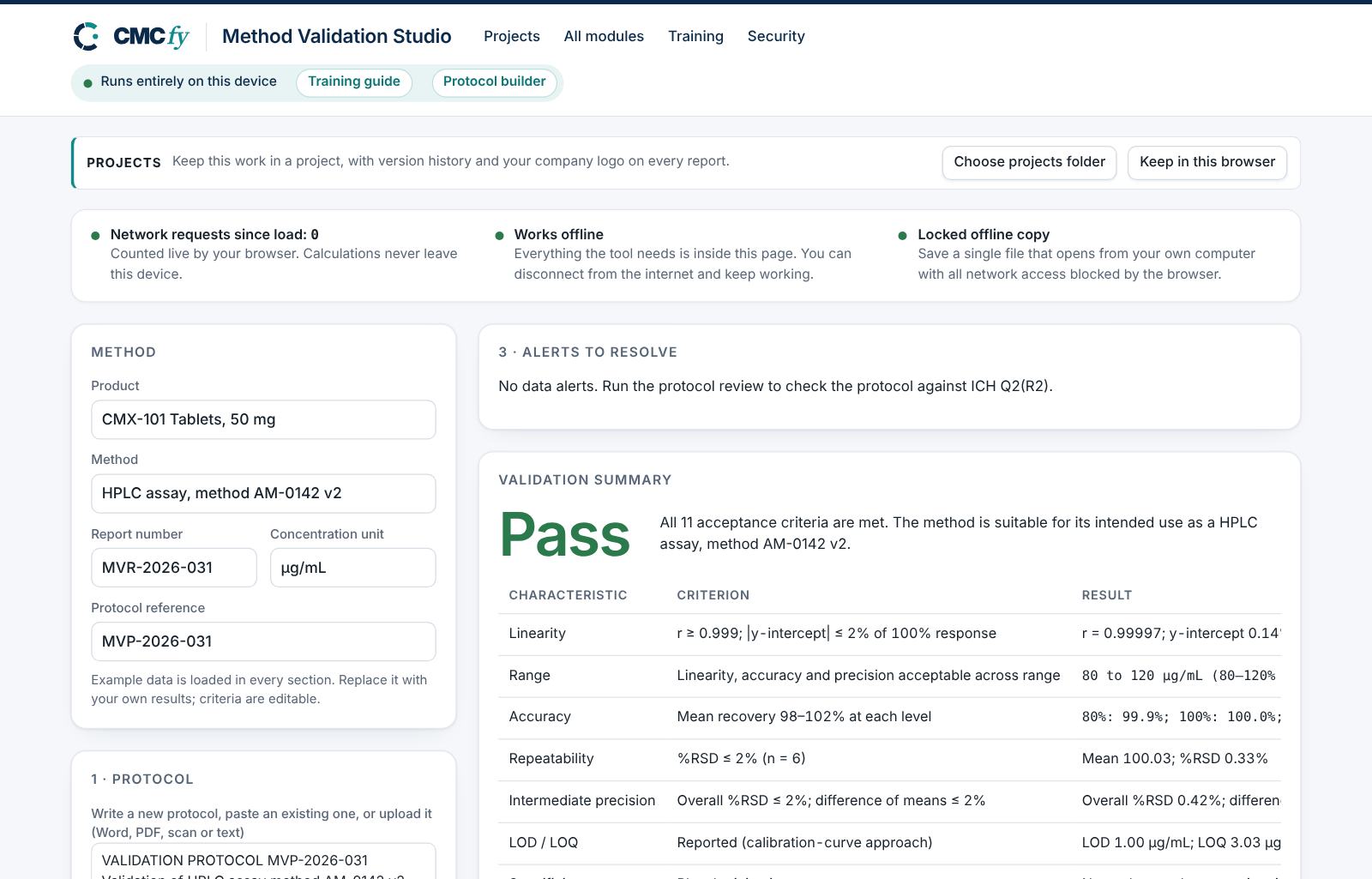
Enter product, method, report number, concentration unit and the protocol reference at the top.
Write or load the protocol
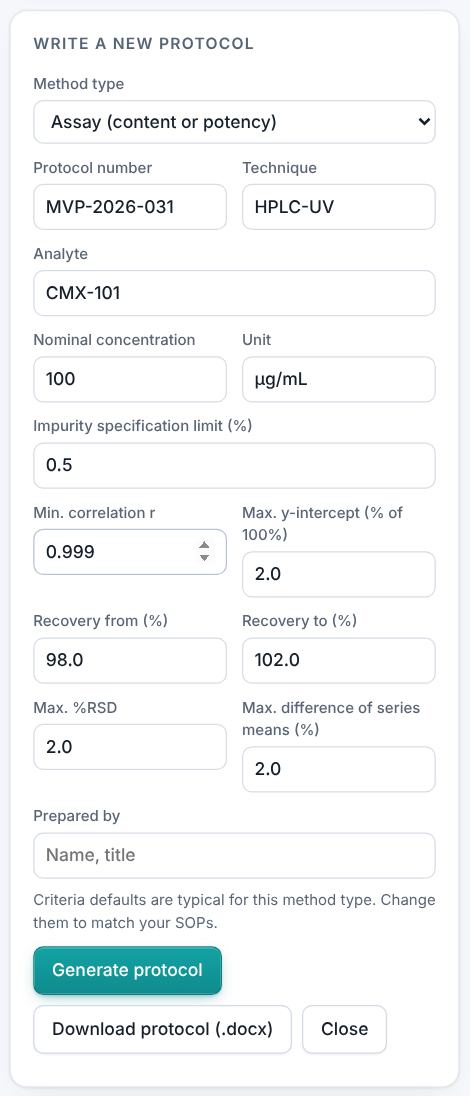
Press Write a new protocol to open the protocol writer: choose the method type, enter the technique, analyte, nominal concentration and criteria, then Generate protocol and Download protocol (.docx). Or paste the approved protocol, or press Upload protocol (Word, PDF, scan or text).
The protocol writer. Enter the data
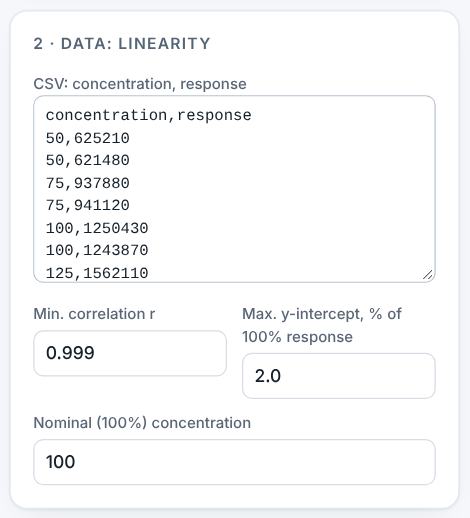
Paste each data set in its box. The criteria next to each box are editable and are used for pass/fail. For linearity give concentration and response; for accuracy the level, theoretical and found; for precision one result per line, and series and result for intermediate precision.
Linearity data with its criteria. Read the summary
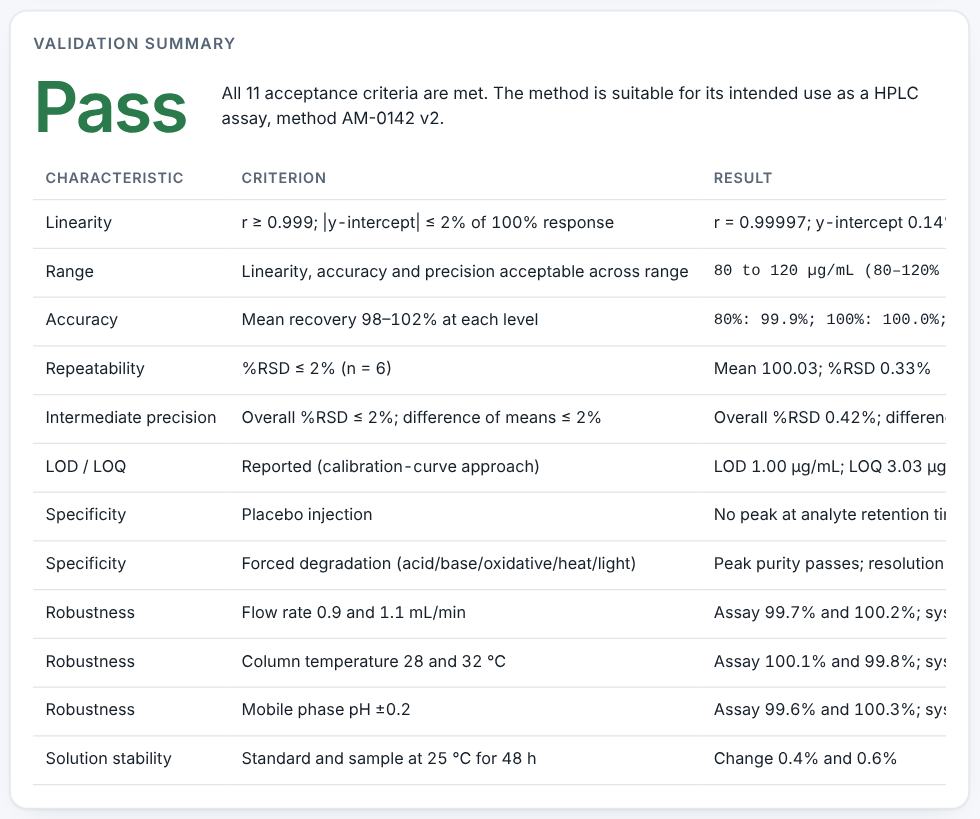
The validation summary shows "Pass": all 11 acceptance criteria are met. Linearity r = 0.99997 with y-intercept 0.14%; accuracy 99.9–100.0%; repeatability %RSD 0.33%; LOD 1.00 µg/mL and LOQ 3.03 µg/mL by the calibration-curve approach.
Resolve alerts
Section 3 lists data alerts (for example fewer than five linearity levels, too few accuracy determinations, no second precision series) and, after the protocol review, protocol findings. Fix them or accept a justification.

Preview, review and download
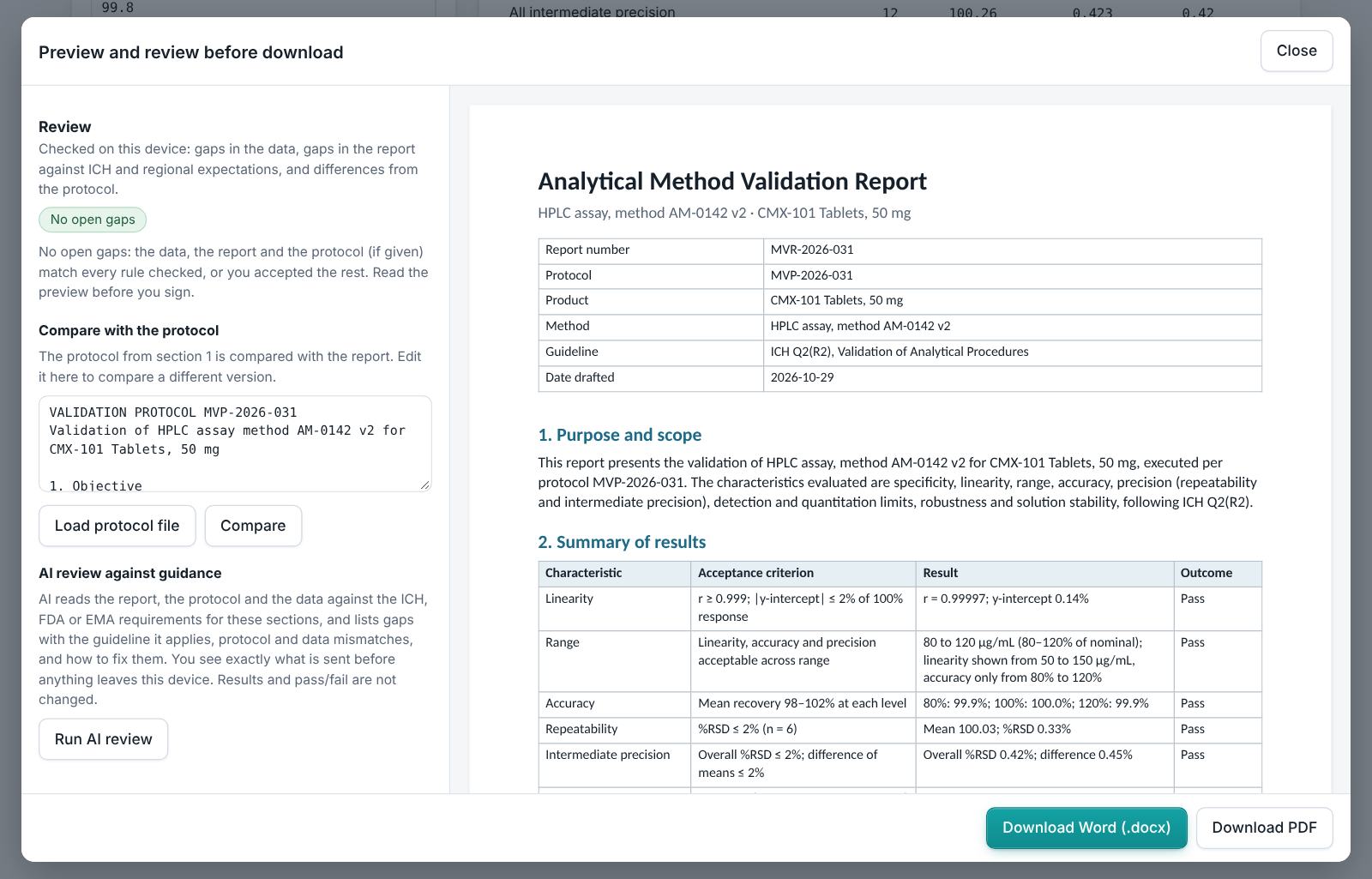
Press Preview and download report. The review compares the report with the protocol in section 1 and lists data and report gaps. Download Word or PDF.
4. Field reference
Every input in the tool, panel by panel. Tables accept rows pasted straight from Excel, comma-separated text, or a loaded file; check the columns after loading a file. Fields marked “when it applies” appear only for the choices that need them.
Method
| Field | What to enter |
|---|---|
| Product, Method, Report number | Type them in; they appear on the report. |
| Concentration unit | For example µg/mL; used for LOD and LOQ. |
| Protocol reference | The protocol number the report refers to. |
1 · Protocol
| Field | What to enter |
|---|---|
| Protocol text | Paste, upload (Word, PDF, scan or text) or write with Write a new protocol. |
| Protocol writer | Method type, protocol number, technique, analyte, nominal concentration and unit, impurity specification limit (impurity methods), the acceptance criteria and the author. Generate protocol, optionally Improve wording with AI, then Download protocol (.docx). |
2 · Data
| Field | What to enter |
|---|---|
| Linearity | Rows of concentration, response. Criteria: minimum correlation r, maximum y-intercept as % of the 100% response, nominal concentration. |
| Accuracy | Rows of level %, theoretical, found. Criteria: recovery from and to (%). |
| Precision | Repeatability: one result per line. Intermediate precision: rows of series, result. Criteria: maximum %RSD and maximum difference of series means. |
| Specificity and robustness | Rows of test, condition, result, meets criterion (yes/no). |
5. Checks and alerts
Calculations and pass/fail outcomes always come from fixed rules, never from AI. The tool checks:
- Linearity by least squares: slope, intercept, r, r², residual SD and y-intercept as % of the 100% response; at least five levels (critical if fewer).
- Range covered by linearity, accuracy and precision.
- Accuracy: recovery = found / theoretical × 100 at each level, with enough determinations (at least nine over three levels).
- Repeatability %RSD with at least six determinations; intermediate precision needs a second series (analyst, day or instrument).
- LOD = 3.3σ/S and LOQ = 10σ/S from the residual SD of the calibration line.
- Specificity results present; each robustness and specificity result judged by its criterion.
- Any criterion entered in the form that differs from the protocol is flagged. The AI protocol review, where available, adds findings against ICH Q2(R2).
How to resolve alerts
- Critical alerts must be fixed in the data; they cannot be justified.
- Major and minor alerts can be fixed, or justified: type the reason and press Accept justification. The report lists every justification.
- The report download is blocked while a critical or unjustified major alert is open. The preview still opens, so you can see the draft.
6. Preview, gap review and download
- Press Preview next to a section, or Preview and download all. The document opens in a preview window, exactly as the Word file will read.
- The left side lists the review, run on your device: gaps in the data (missing values, open alerts), gaps in the report (missing content the guidance expects, placeholders such as [site] or TBD left in the text) and, if you load the approved protocol under Compare with the protocol, differences from the protocol (requirements, criteria, batches or time points it plans that the report does not show).
- Click a finding to jump to the place in the preview. Fix it in the tool, then preview again.
- Optional AI review: a second read for contradictions, claims without data and vague wording. The report text is sent to Claude only when you press it, and only where your plan includes AI. Check every AI finding; AI can be wrong.
- Press Download Word (.docx) or Download PDF. With several documents open, All as Word (.zip) and All as PDF (.zip) download the set. The download buttons stay disabled while a blocking alert is open; the preview still works.
Documents this module produces
| Section | Document |
|---|---|
| Protocol | Validation protocol (.docx) from the protocol writer |
| Report | Validation report for 3.2.S.4.3 or 3.2.P.5.3 |
7. US and EU submissions
ICH Q2(R2) and Q14 apply in both regions. US reports also cite USP <1225> and <1226>; EU reports cite Ph. Eur. 2.2.46 and the relevant general chapters. Write the protocol for the region where the method will be filed.
8. Working with other modules
- Method summaries in the specification are written by the Specification Builder.
- An invalid run or failing result during validation can be recorded in the Investigation Studio (OOS, deviation, CAPA).
- Upload a validation report written elsewhere to the Report Reviewer for a gap check.
9. Common pitfalls
- Criteria in the form that differ from the approved protocol: the tool flags them, and the protocol wins.
- Pasting accuracy data as recoveries only: give theoretical and found so recovery is calculated.
- Only one precision series, so intermediate precision cannot be shown.
- Reading LOD/LOQ from the calibration line for an impurity method without confirming them experimentally.
10. Practice exercises
Each exercise starts from the example (press Load example to reset). We run these on every update of this guide, so the result you see should match.
Tighten the linearity criterion
Change Min. correlation r under linearity to 0.99999.
Expected resultThe summary changes to Fail, with linearity not met.
Remove intermediate precision
Clear the intermediate precision box.
Expected resultA major alert says there is no second series in the data.