Dossier assembly and review · Training guide
Report Reviewer
Upload any CMC section or report written anywhere and get a list of what a reviewer would find missing, with the guidance that asks for it and what to add.
Open the tool at https://app.cmcfy.com/app/report-reviewer.html. This guide is also online at https://cmcfy.com/guides/report-reviewer.html
1. What this module does
The Report Reviewer checks documents that were not written in CMCfy: a CTD section from a CRO, a legacy stability report, a validation report or a whole Module 3. Each section is checked against what ICH M4Q and the cited guidance expect for that section, for the region and product type you choose.
Upload a whole Module 3 or QOS and it finds each section by its heading. You can also load the approved protocol to check that each requirement and acceptance criterion appears in the report.
What you get
- A list of findings on screen, each with what is missing, why (the guidance) and what to add.
2. Before you start
Have these ready. You can still start with the example data and replace it piece by piece.
- The document as Word, PDF, scanned pages, Excel or text, or its text to paste.
- Optionally the protocol it was written against.
3. Step by step with the example
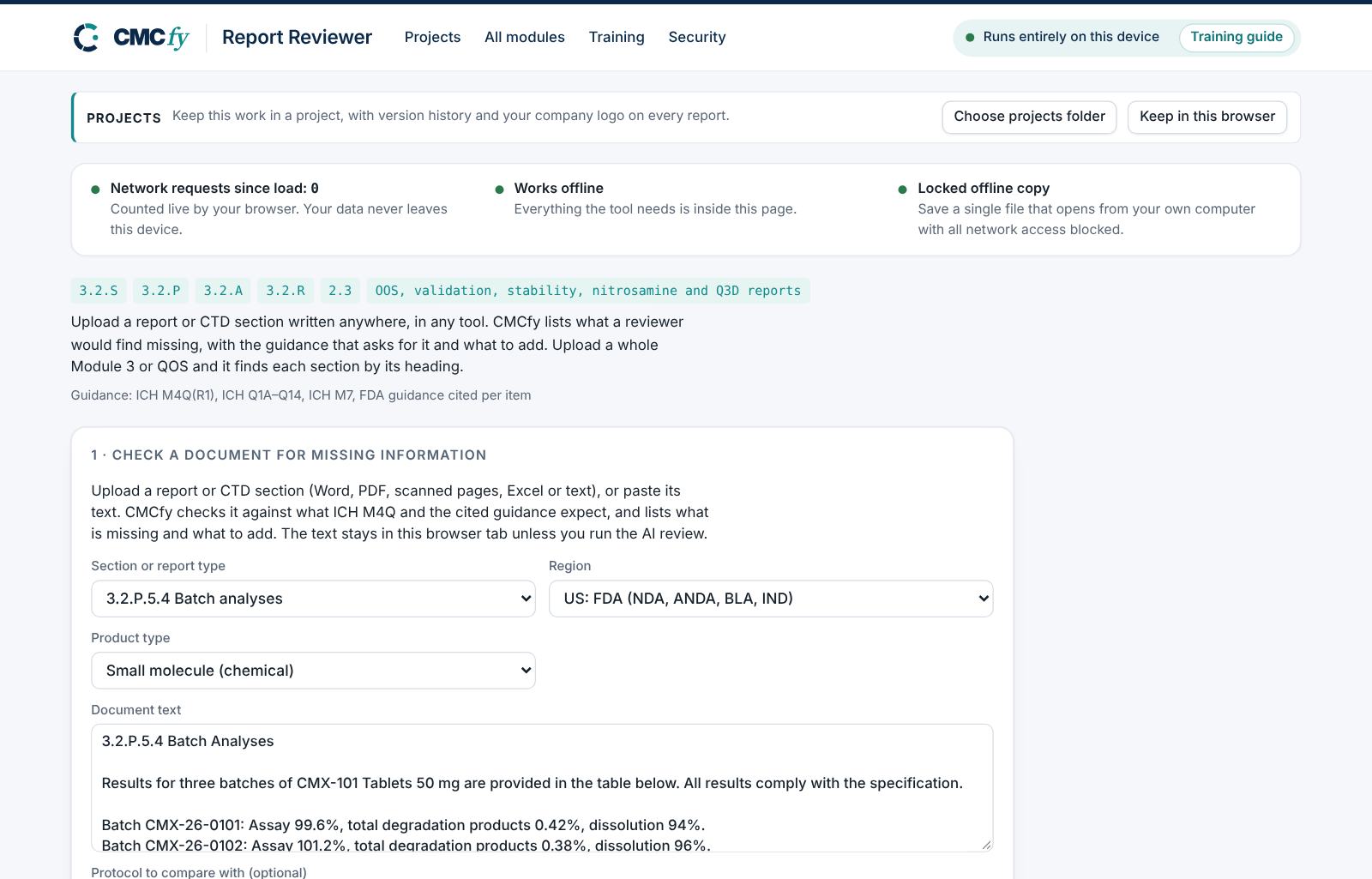
Open the tool at app.cmcfy.com/app/report-reviewer.html. The example (a short 3.2.P.5.4 batch analyses section) is checked automatically when the page opens.
Choose what you are checking
Choose the Section or report type, the Region and the Product type (small molecule, large molecule, or not sure to check both).
Load the document
Press Load files (several files are checked together) or paste the text. Scanned pages are read by text recognition on your computer.
Compare with the protocol (optional)
Paste or press Load protocol. Each requirement and acceptance criterion in it is looked for in the document.
Read the findings
Press Check document. Each finding says what is missing, the guidance that expects it, and what to add. For the example, the short batch analyses section has batch numbers, batch size and results, but is missing the site and date of manufacture, the use of each batch and the drug substance batch used.
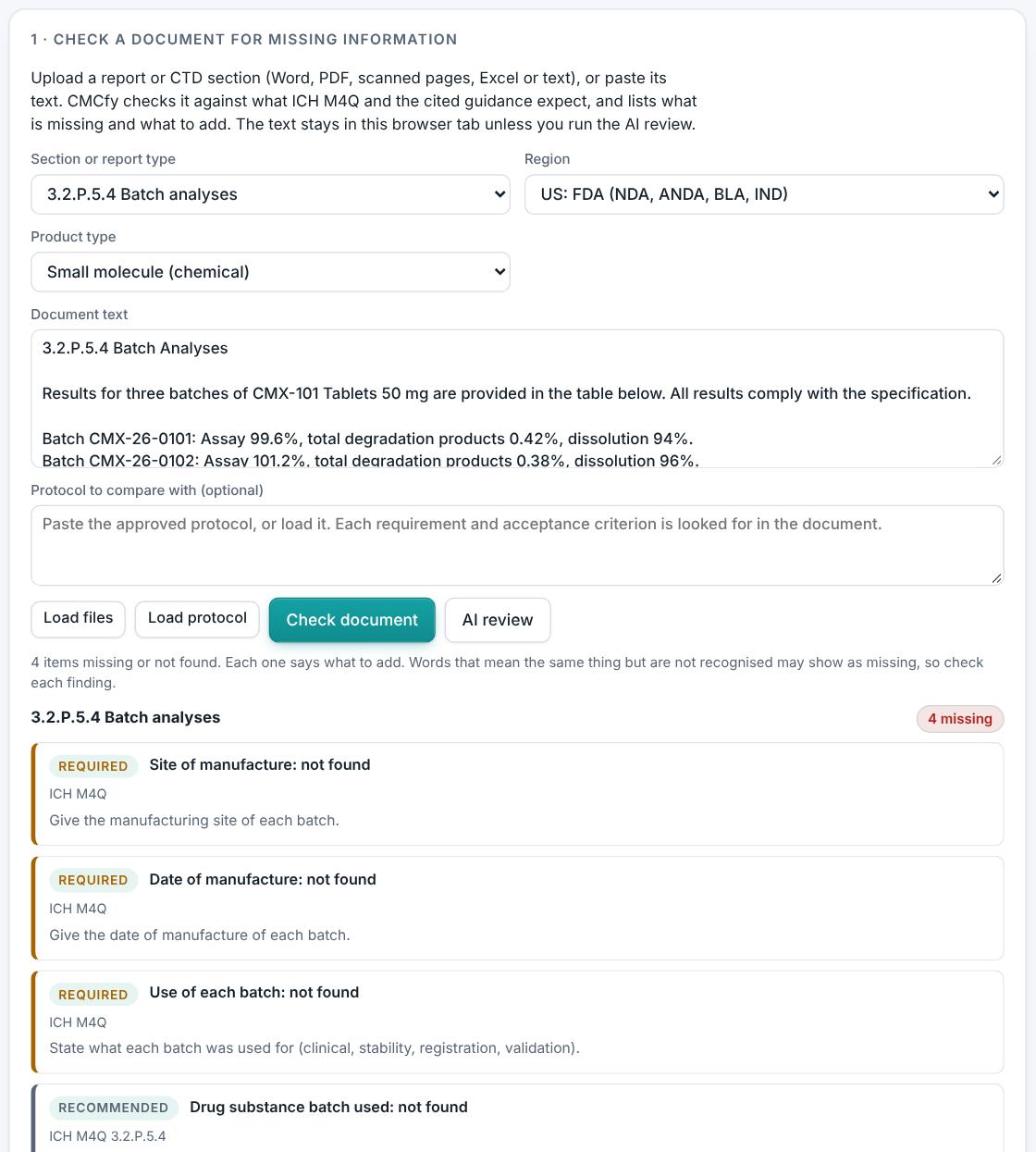
Findings for the example batch analyses section. Optional AI review against guidance
Press AI review. AI reads the document, the protocol and any data against the ICH, FDA or EMA requirements for the section, and lists gaps with the guideline it applies, protocol and data mismatches, and how to fix each. A box first shows the exact text that will be sent, and nothing leaves the computer until you press Send. Quotes and numbers the AI cites are checked against your documents. Where the text goes is set in AI settings in the header.
4. Field reference
Every input in the tool, panel by panel. Tables accept rows pasted straight from Excel, comma-separated text, or a loaded file; check the columns after loading a file. Fields marked “when it applies” appear only for the choices that need them.
Check a document for missing information
| Field | What to enter |
|---|---|
| Section or report type | The CTD section or report type to check against (for example 3.2.P.5.4, a stability report, an OOS report, a nitrosamine or Q3D report). |
| Region | US, EU or both: decides the regional references expected. |
| Product type | Small molecule, large molecule (biotechnology product) or not sure: check both. |
| Document text | Paste the text, or Load files (Word, PDF, scanned pages, Excel or text). |
| Protocol to compare with (optional) | Paste it or Load protocol. |
5. Checks and alerts
Calculations and pass/fail outcomes always come from fixed rules, never from AI. The tool checks:
- Required content for the section or report type, by ICH M4Q and the cited ICH, FDA and EMA guidance, for the region and product type.
- Whole Module 3 or QOS documents are split by section heading and each section is checked.
- Protocol comparison: requirements, acceptance criteria, batches and time points named in the protocol but not in the report.
- The checks look for content by keywords, so wording they do not recognise can show as missing: check each finding.
6. Preview, gap review and download
The Report Reviewer does not write documents; the findings on screen are the result. Fix the document in its own editor, then check it again.
- Press Check document again after each change; changing the region or product type re-runs the check.
- The document text stays in this browser tab unless you press AI review and approve what is sent.
7. US and EU submissions
Choose the region the document will be filed in. US mode expects USP and FDA references and US regional content; EU mode expects Ph. Eur. and EMA references and EU regional content; both checks for both.
8. Working with other modules
- Every CMCfy module has the same check built in under Check a document for missing information, with a Use this tool's draft button that checks the module's own draft.
- Once a section is complete, add it to the eCTD folder in the QOS Composer & Dossier Assembler.
9. Common pitfalls
- Checking a whole Module 3 with the wrong section type selected: choose the Module 3 or QOS option so it splits by heading.
- Treating a keyword miss as a real gap without reading the document: if the content is there in other words, ignore the finding.
- Forgetting to set the product type for a biologic, so Q6B and Q5 items are not checked.
10. Practice exercises
Each exercise starts from the example (press Load example to reset). We run these on every update of this guide, so the result you see should match.
Check a thinner section
Replace the document text with "3.2.P.5.4 Batch Analyses. All batches comply." and press Check document.
Expected resultThe findings list the missing batch information, starting with the results table.