Biologics · Training guide
Biologics Stability Studio
Write the stability sections for a protein product: each stability-indicating attribute trended by ICH Q1E regression, the shelf life limited to the real-time data as ICH Q5C expects, and the supporting studies checked.
Open the tool at https://app.cmcfy.com/app/biologics-stability.html. This guide is also online at https://cmcfy.com/guides/biologics-stability.html
1. What this module does
The module writes 3.2.S.7 or 3.2.P.8 for a protein. You enter the stability-indicating attributes with their limits and the long-term results; the tool fits each attribute and reports the time at which it would meet its limit.
Unlike small molecules, ICH Q5C does not allow extrapolation beyond real-time data, so the supported shelf life is capped at the longest real-time time point even when the statistics would allow more.
What you get
- Word or PDF files for 3.2.P.8.1 (or 3.2.S.7.1) summary and conclusions, 8.2 post-approval protocol and commitment, and 8.3 stability data.
- A summary file for the QOS Composer & Dossier Assembler, which checks the shelf life and storage statement against the other sections.
2. Before you start
Have these ready. You can still start with the example data and replace it piece by piece.
- Long-term condition, proposed shelf life and the container used in the study.
- Each stability-indicating attribute with its lower and/or upper limit and units.
- Long-term results: one row per batch, attribute, month and result (an Excel export works).
- Summaries of accelerated, stress, photostability, freeze-thaw, in-use and shipping studies, and the post-approval commitment.
3. Step by step with the example
Open the tool at app.cmcfy.com/app/biologics-stability.html. The example is loaded when the page opens, so every panel already has realistic data. Follow the steps to see how it works, then replace the example with your own data.
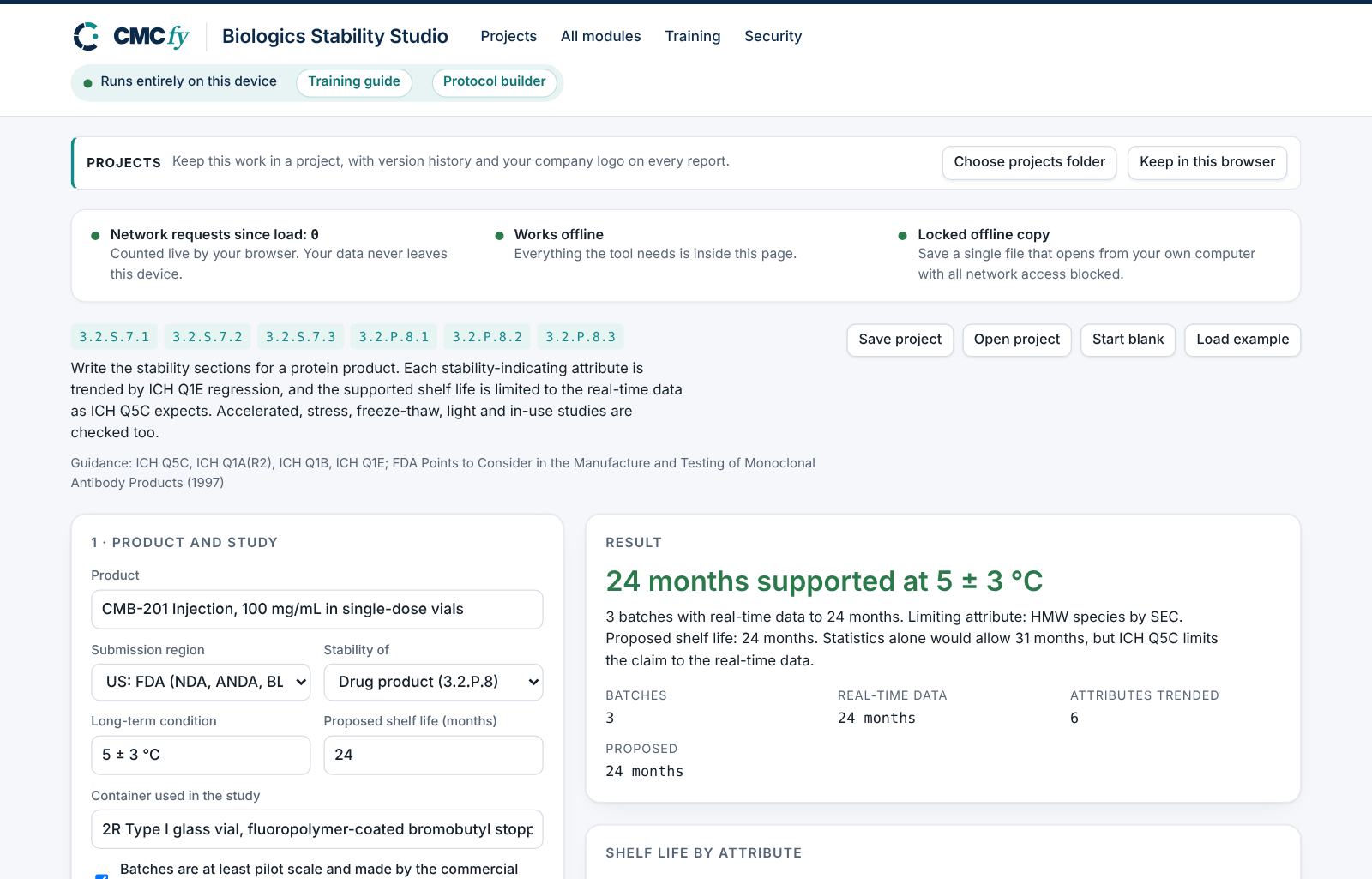
Enter product and study design
Choose drug product or drug substance, the long-term condition (5 ± 3 °C in the example) and the proposed shelf life (24 months). Tick that batches are at least pilot scale and made by the commercial process.
Enter attributes and results
Enter the limits table and the results table. Load an Excel or CSV file with the same columns if you have one.
Read the shelf life
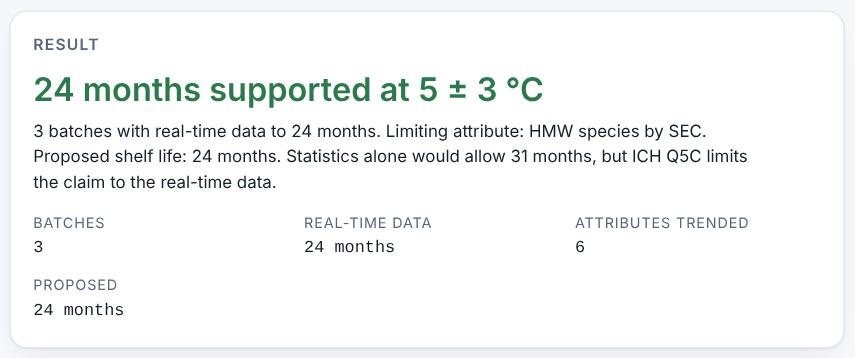
The headline reads "24 months supported at 5 ± 3 °C": 3 batches with real-time data to 24 months, limiting attribute HMW species by SEC. Statistics alone would allow 31 months, but Q5C limits the claim to the real-time data.
Check each attribute
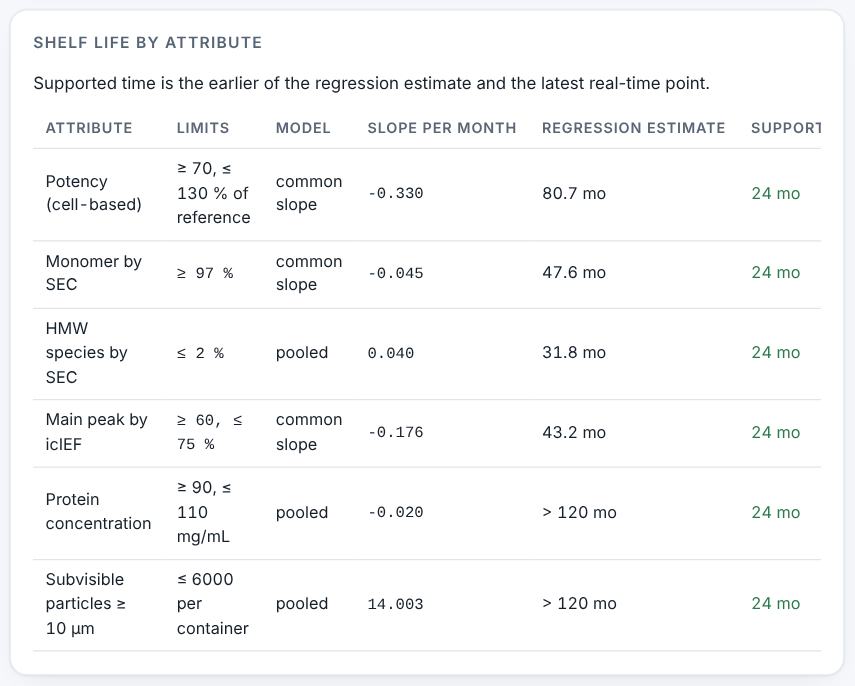
The table shows each attribute with its trend and the month it would meet its limit, and the stability-indicating profile checks that potency, purity, aggregates and charge variants are all covered.
Shelf life by attribute. Resolve alerts
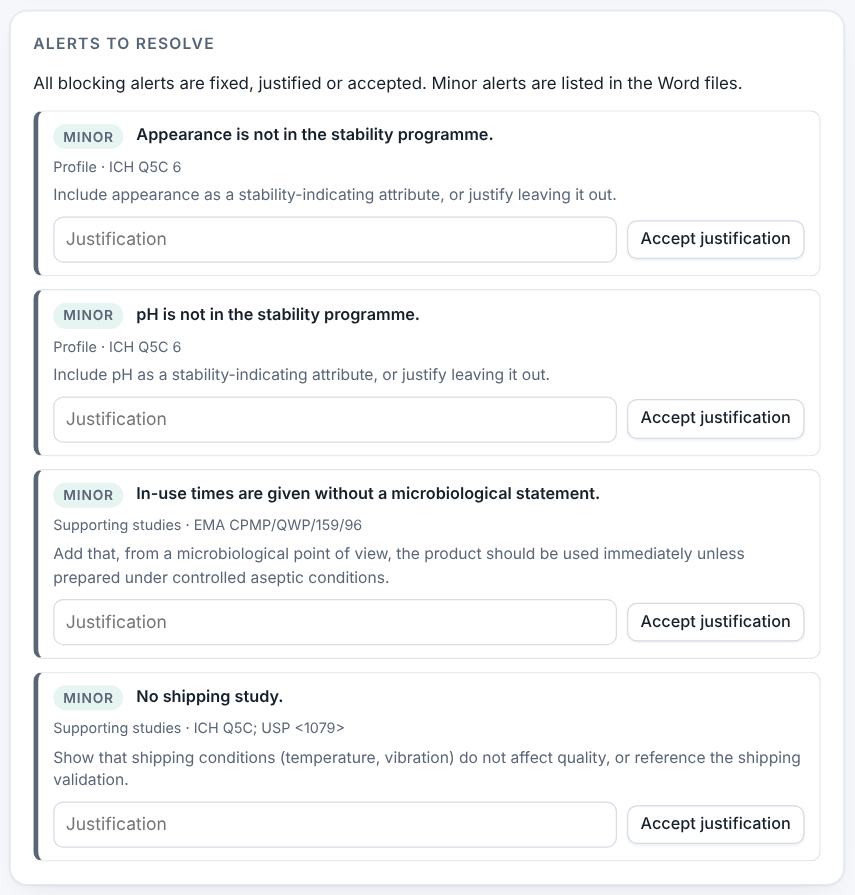
The example has four minor alerts: two attributes not in the programme, in-use times without a microbiological statement, and no shipping study.
Preview and download
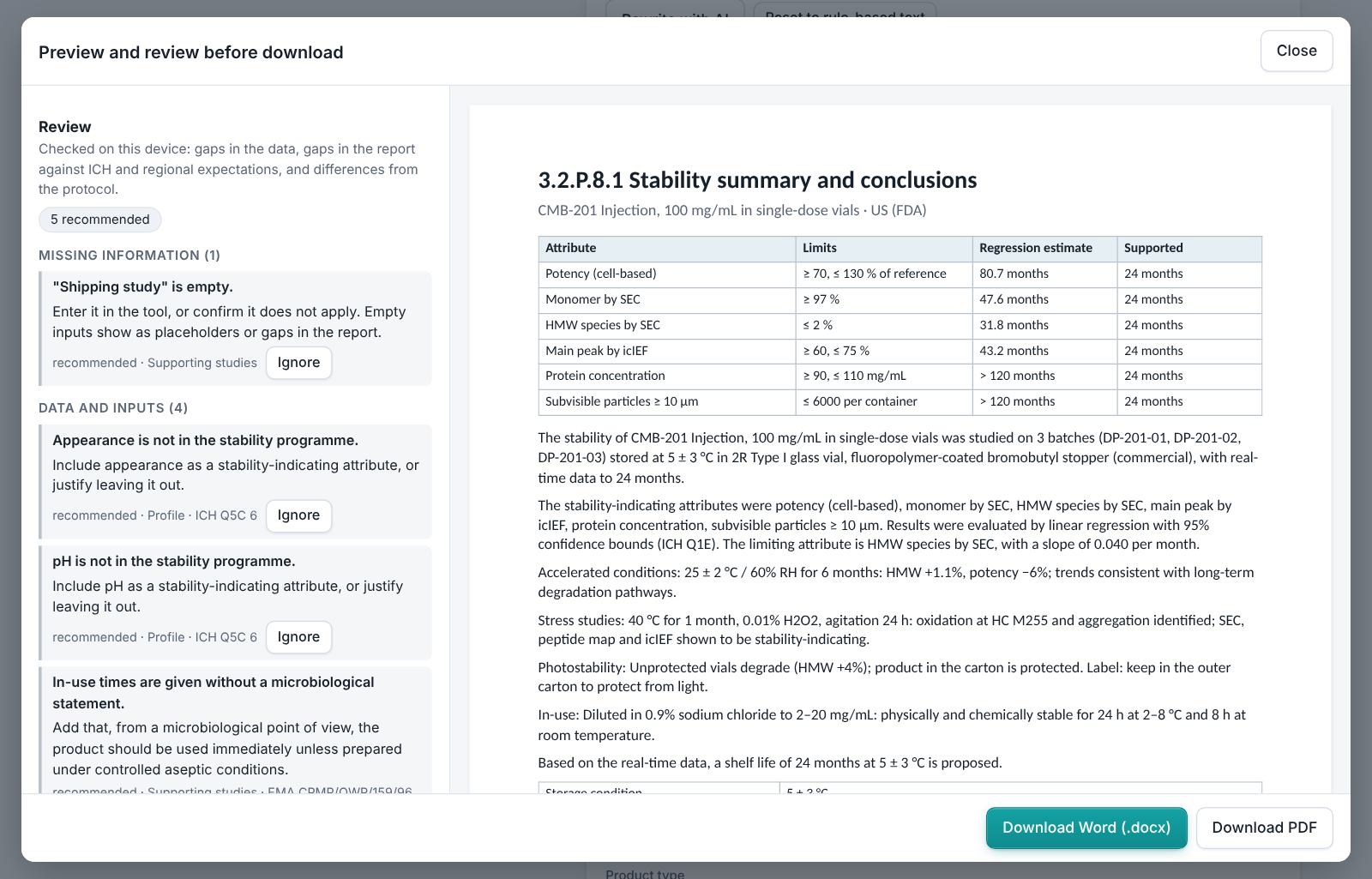
Preview the three stability sections, read the review and download.
4. Field reference
Every input in the tool, panel by panel. Tables accept rows pasted straight from Excel, comma-separated text, or a loaded file; check the columns after loading a file. Fields marked “when it applies” appear only for the choices that need them.
1 · Product and study
| Field | What to enter |
|---|---|
| Product | Type it in. |
| Submission region | Choose one: US: FDA (NDA, ANDA, BLA, IND); EU: EMA and national agencies (MAA); Both US and EU. |
| Stability of | Choose one: Drug product (3.2.P.8); Drug substance (3.2.S.7). |
| Long-term condition | Type it in. |
| Proposed shelf life (months) | Type a number. |
| Container used in the study | Type it in. |
| Batches are at least pilot scale and made by the commercial process | Tick the box if it applies. |
2 · Long-term results
One row per batch, attribute and time point. Load an Excel or CSV export with the same columns.
| Field | What to enter |
|---|---|
| Stability-indicating attributes and limits | A table. Columns: Attribute | Lower limit | Upper limit | Units. Paste rows from Excel, type comma-separated rows, or press Load file (Excel, CSV, Word, PDF or a scan). |
| Results | One row per batch, attribute and time point. Attribute names must match the limits table. A table. Columns: Batch | Attribute | Month | Result. Paste rows from Excel, type comma-separated rows, or press Load file (Excel, CSV, Word, PDF or a scan). |
3 · Supporting studies
| Field | What to enter |
|---|---|
| Accelerated condition and outcome | Type it in. |
| Stress studies (temperature, pH, oxidation, agitation) | Type it in. |
| Photostability (ICH Q1B) | Type it in. |
| Freeze-thaw (drug substance) or temperature excursion | Type it in. |
| In-use stability after dilution | Type it in. |
| Shipping study | Type it in. |
| Post-approval commitment | Type it in. |
5. Checks and alerts
Calculations and pass/fail outcomes always come from fixed rules, never from AI. The tool checks:
- At least three batches on long-term stability, of at least pilot scale and the commercial process; the container stated; enough months of real-time data.
- Proposed shelf life not beyond the real-time data; no attribute predicted to meet its limit before the proposed shelf life (critical).
- Results outside the limits are critical; attributes with limits need results; results need limits.
- Accelerated, stress, photostability, freeze-thaw (drug substance), in-use (with a microbiological statement) and shipping studies.
- A post-approval stability commitment.
How to resolve alerts
- Critical alerts block the download and must be fixed in the data. A failing result can instead be linked to an investigation: type the investigation reference and outcome and press Record.
- Major alerts block the download until you fix them or type a justification and press Accept justification.
- Minor alerts do not block anything. They are listed in the documents so the reviewer sees them.
- Some alerts have an Apply fix button that makes the change for you. Reopen undoes a justification.
Narratives
This module writes: Stability summary and conclusions. Each narrative is written by fixed rules from your data. You can edit it in the box. Rewrite with AI (where your plan includes AI) rewrites it in regulatory style; every number in the text is checked against your data, and a number that does not match is flagged under the box and blocks the download until you correct it. Reset to rule-based text brings back the original.
6. Preview, gap review and download
- Press Preview next to a section, or Preview and download all. The document opens in a preview window, exactly as the Word file will read.
- The left side lists the review, run on your device: gaps in the data (missing values, open alerts), gaps in the report (missing content the guidance expects, placeholders such as [site] or TBD left in the text) and, if you load the approved protocol under Compare with the protocol, differences from the protocol (requirements, criteria, batches or time points it plans that the report does not show).
- Click a finding to jump to the place in the preview. Fix it in the tool, then preview again.
- Optional AI review: a second read for contradictions, claims without data and vague wording. The report text is sent to Claude only when you press it, and only where your plan includes AI. Check every AI finding; AI can be wrong.
- Press Download Word (.docx) or Download PDF. With several documents open, All as Word (.zip) and All as PDF (.zip) download the set. The download buttons stay disabled while a blocking alert is open; the preview still works.
Documents this module produces
| Section | Document |
|---|---|
| 3.2.P.8.1 / 3.2.S.7.1 | Stability summary and conclusions |
| 3.2.P.8.2 / 3.2.S.7.2 | Post-approval stability protocol and stability commitment |
| 3.2.P.8.3 / 3.2.S.7.3 | Stability data |
Use Save project to keep your work as a file on your computer, and Open project to continue later. Start blank clears every field; Load example brings the example back. Nothing is stored on CMCfy servers.
7. US and EU submissions
ICH Q5C and Q1E apply in both regions. US mode writes the storage statement in USP terms (for example "Store refrigerated at 2–8 °C"); EU mode uses the EU wording ("Store in a refrigerator (2 °C – 8 °C)") from the EMA guideline on declaration of storage conditions.
8. Working with other modules
- Small-molecule stability is the Stability Studio.
- Limits come from Biologics Characterisation & Specification.
- In-use compatibility links to the Biologics Drug Product Writer.
9. Common pitfalls
- Proposing a shelf life longer than the real-time data, expecting extrapolation as for small molecules.
- Attribute names that differ between the limits and results tables.
- Leaving the post-approval commitment empty.
- In-use hold times with no statement on microbiological risk.
10. Practice exercises
Each exercise starts from the example (press Load example to reset). We run these on every update of this guide, so the result you see should match.
Propose a longer shelf life
Change Proposed shelf life (months) to 36.
Expected resultA major alert says the proposed 36 months is beyond the real-time data (24 months).
Remove the commitment
Clear Post-approval commitment.
Expected resultA major alert says there is no post-approval stability commitment.