Reports behind the sections · Training guide
Stability Studio
Estimate shelf life from long-term data by ICH Q1E regression with batch poolability testing, and write a stability report with chart, tables, conclusion and the post-approval commitment.
Open the tool at https://app.cmcfy.com/app/stability-studio.html. This guide is also online at https://cmcfy.com/guides/stability-studio.html
1. What this module does
Paste the long-term results for one attribute (batch, time in months, value). The tool fits a regression per batch, tests whether batches can be pooled (ANCOVA at the 0.25 significance level, slopes first, then intercepts), and finds where the one-sided 95% confidence bound meets the acceptance criterion.
The proposed shelf life is capped by the ICH Q1E extrapolation limits: no more than twice the data period and no more than 12 months beyond it. The report includes study design, results, poolability tests, the chart, the conclusion, the storage statement and blank sign-off lines.
What you get
- A stability report in Word or PDF for one attribute, including the post-approval stability protocol and commitment (3.2.S.7.2 / 3.2.P.8.2).
- A summary file for the QOS Composer & Dossier Assembler, which checks the shelf life and stability batches against the other sections.
2. Before you start
Have these ready. You can still start with the example data and replace it piece by piece.
- Product, report number, stability protocol number and storage condition.
- The attribute, unit and acceptance criterion (lower limit, upper limit or both).
- Results as a table of batch, time (months) and value. Excel, CSV, PDF and scanned tables can be loaded.
- A summary of accelerated, intermediate and photostability results, and whether the batches are production scale.
3. Step by step with the example
Open the tool at app.cmcfy.com/app/stability-studio.html. The example (Assay of three registration batches, 0 to 18 months at 25 °C/60% RH) is loaded when the page opens. Press Load example at any time to bring it back.
Describe the study
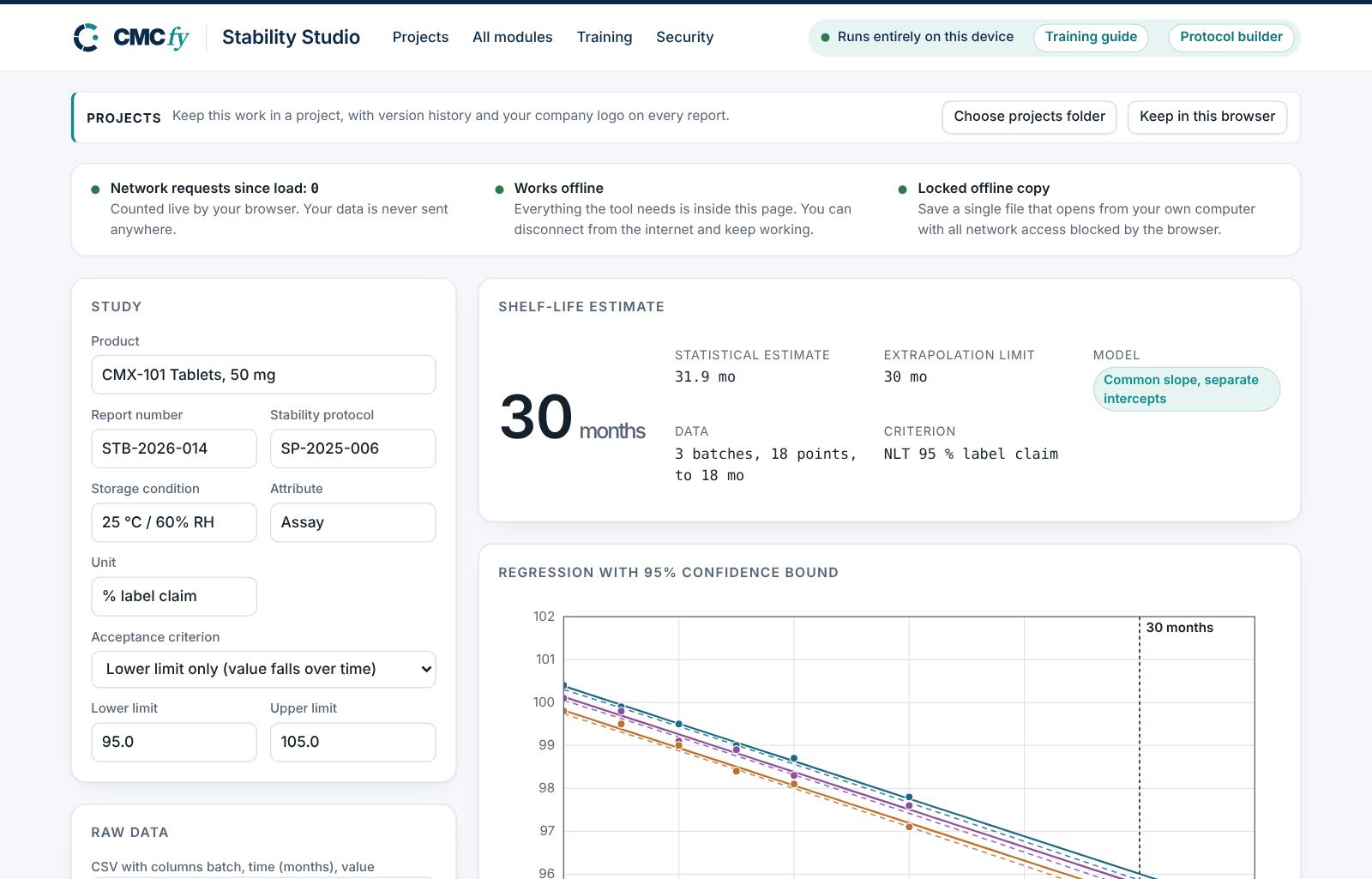
Enter the product, report and protocol numbers, the storage condition, the attribute and its unit. Choose the acceptance criterion: lower limit only (values fall over time, for example assay), upper limit only (values rise, for example a degradation product) or both.
Enter the raw data
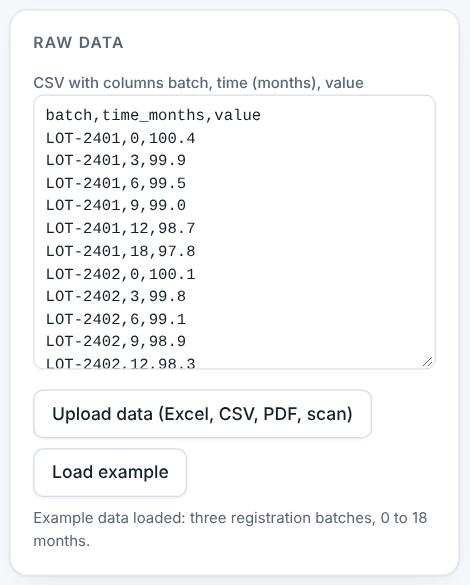
Paste or load the data with three columns: batch, time in months, value. Press Upload data (Excel, CSV, PDF, scan) to read a file; check the columns after loading.
The raw data panel. Read the shelf-life estimate
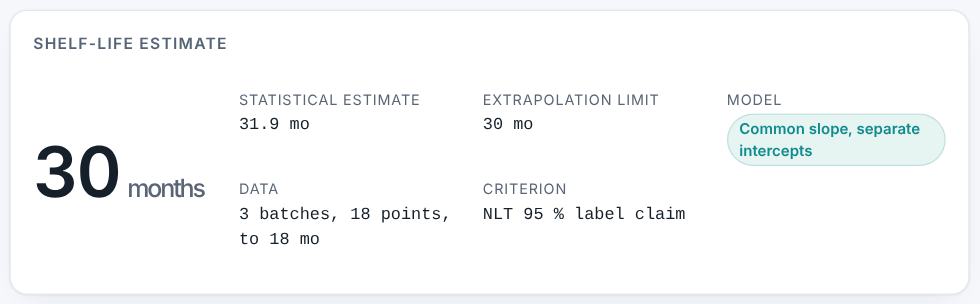
The result shows a proposed 30 months: the statistical estimate is 31.9 months, but with 18 months of data the extrapolation limit is 30 months. The model used is common slope, separate intercepts.
Read the chart and the statistics
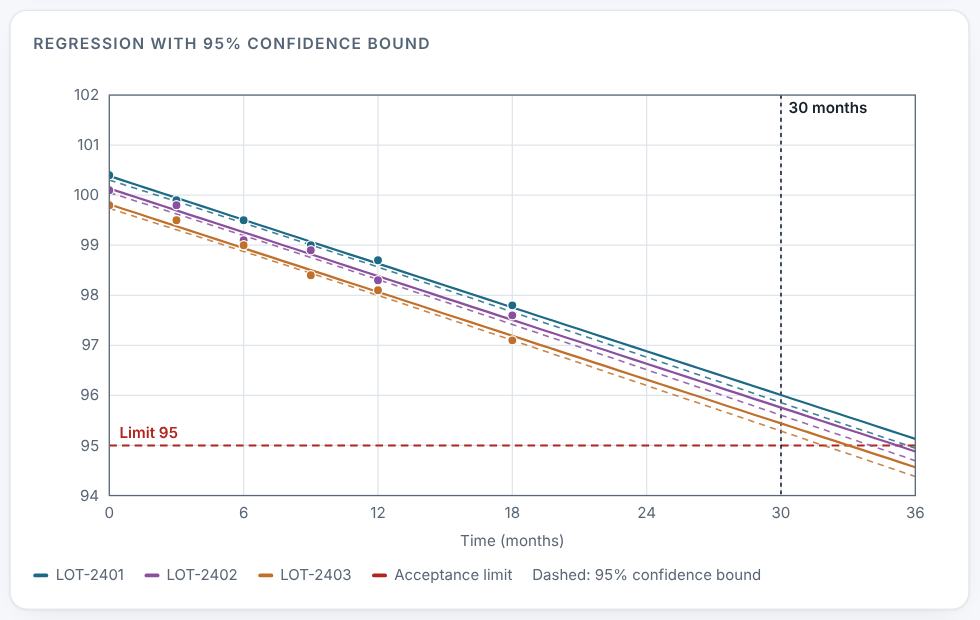
The chart shows each batch with its regression line, the dashed 95% confidence bound and the limit. The statistics panel gives the poolability tests (slopes p = 0.4088, poolable; intercepts p < 0.0001, not poolable) and the line for each batch. LOT-2403 reaches the limit first and sets the shelf life.
Regression with 95% confidence bound. Complete the report details
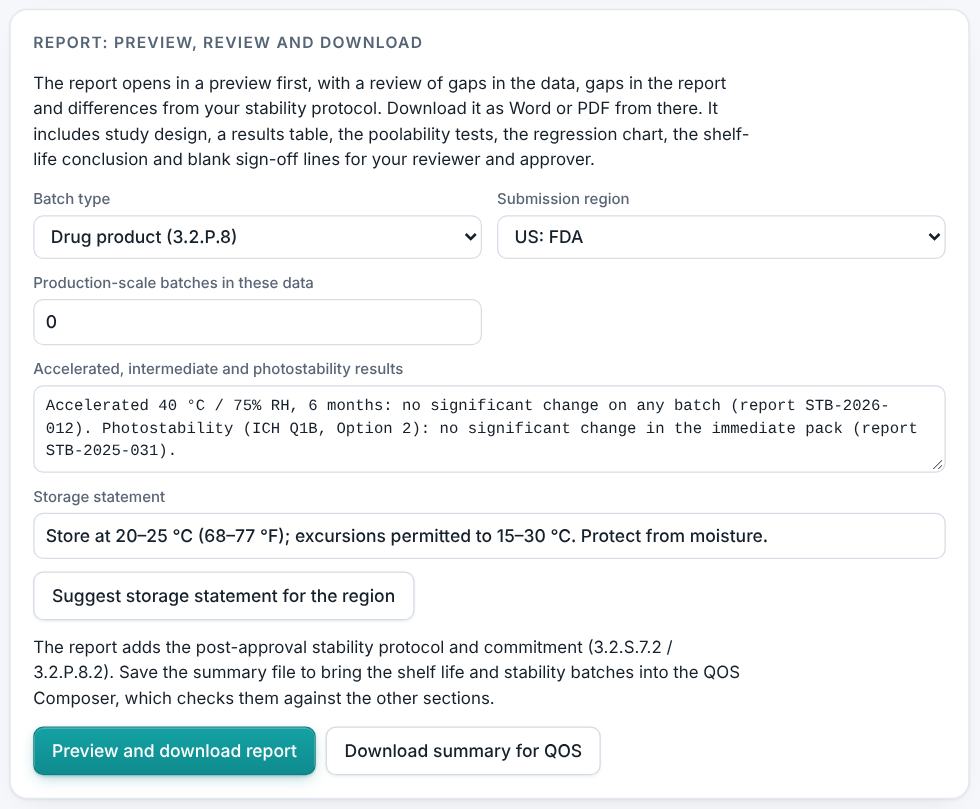
In the report panel choose drug product or drug substance, the region and whether the batches are production scale, and summarise the accelerated, intermediate and photostability results. Press Suggest storage statement for the region for the regional wording.
Preview, review and download
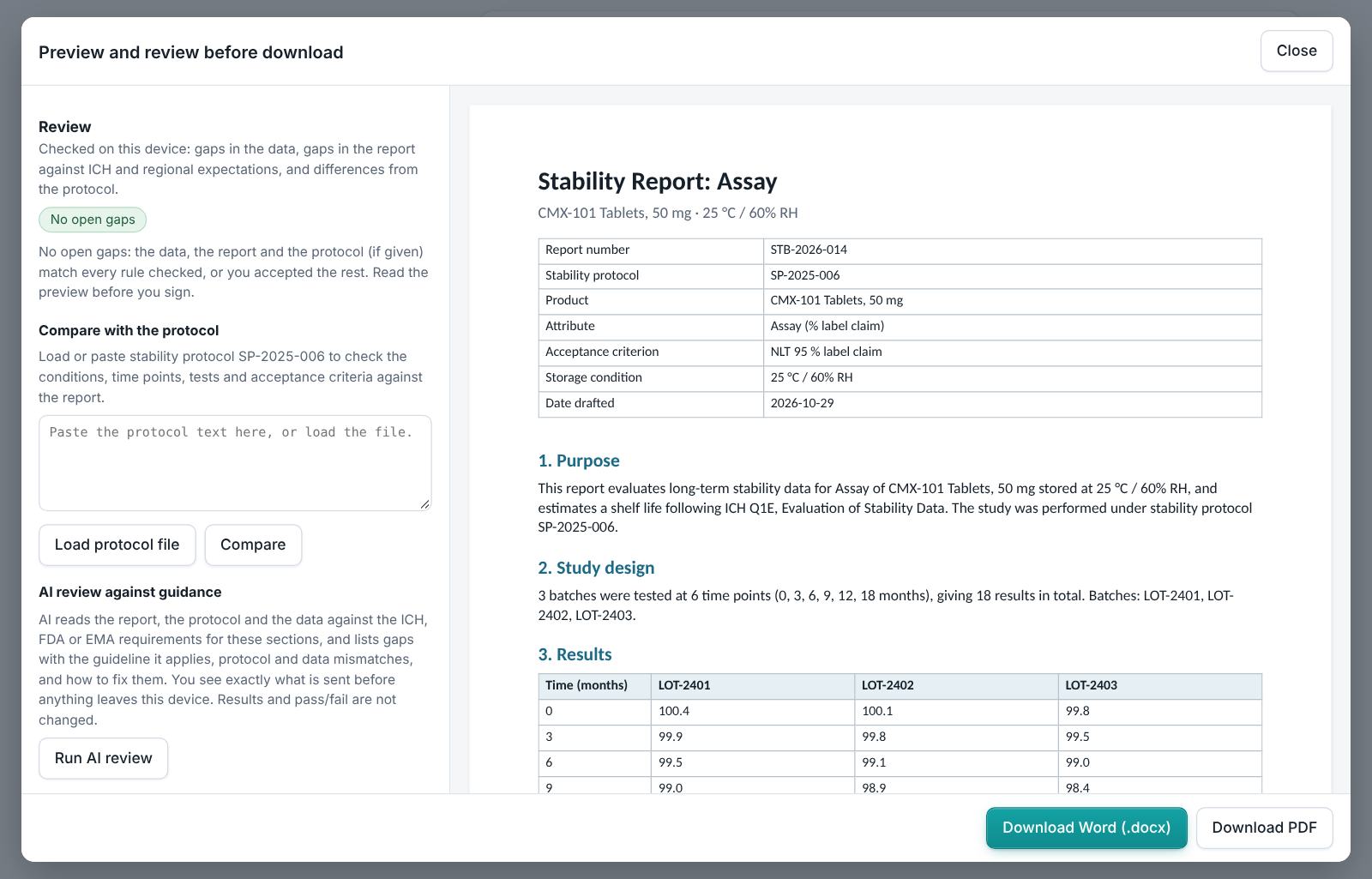
Press Preview and download report. The review lists data gaps (for example missing time points or results outside the criterion) and report gaps, and you can load the stability protocol to compare conditions, time points, tests and criteria. Then download Word or PDF. Press Download summary for QOS to save the summary.
4. Field reference
Every input in the tool, panel by panel. Tables accept rows pasted straight from Excel, comma-separated text, or a loaded file; check the columns after loading a file. Fields marked “when it applies” appear only for the choices that need them.
Study
| Field | What to enter |
|---|---|
| Product, Report number, Stability protocol | Type them in; they appear on the report and the protocol number is used in the protocol comparison. |
| Storage condition | The long-term condition, for example 25 °C / 60% RH. Used for the storage statement. |
| Attribute, Unit | One attribute per report, for example Assay and % label claim. |
| Acceptance criterion | Choose lower limit only, upper limit only, or both; then enter the limit or limits. |
Raw data
| Field | What to enter |
|---|---|
| CSV with columns batch, time (months), value | One row per result. Paste from Excel or press Upload data (Excel, CSV, PDF, scan). |
Report
| Field | What to enter |
|---|---|
| Batch type | Drug product (3.2.P.8) or drug substance (3.2.S.7). |
| Submission region | US, EU or both; sets references and the storage statement wording. |
| Production-scale batches in these data | Says whether the batches are production scale; affects the commitment text. |
| Accelerated, intermediate and photostability results | A short summary; needed when the shelf life extrapolates beyond real-time data. |
| Storage statement | Type it or press Suggest storage statement for the region. |
5. Checks and alerts
Calculations and pass/fail outcomes always come from fixed rules, never from AI. The tool checks:
- Poolability by ANCOVA at the 0.25 level: common slope and intercept, common slope with separate intercepts, or separate lines. The batch that meets the limit first sets the shelf life.
- Shelf life where the one-sided 95% confidence bound of the mean (two-sided for two limits) meets the criterion, capped by the ICH Q1E extrapolation limits.
- In the preview review: fewer than three batches; less than 12 months of long-term data; accelerated data shorter than 6 months; time points or batches without results; results outside the criterion (critical); significant change at accelerated conditions with extrapolation; no accelerated summary; no storage statement; no unit; data that support no shelf life (critical).
6. Preview, gap review and download
- Press Preview next to a section, or Preview and download all. The document opens in a preview window, exactly as the Word file will read.
- The left side lists the review, run on your device: gaps in the data (missing values, open alerts), gaps in the report (missing content the guidance expects, placeholders such as [site] or TBD left in the text) and, if you load the approved protocol under Compare with the protocol, differences from the protocol (requirements, criteria, batches or time points it plans that the report does not show).
- Click a finding to jump to the place in the preview. Fix it in the tool, then preview again.
- Optional AI review: a second read for contradictions, claims without data and vague wording. The report text is sent to Claude only when you press it, and only where your plan includes AI. Check every AI finding; AI can be wrong.
- Press Download Word (.docx) or Download PDF. With several documents open, All as Word (.zip) and All as PDF (.zip) download the set. The download buttons stay disabled while a blocking alert is open; the preview still works.
Documents this module produces
| Section | Document |
|---|---|
| Stability report | Report for one attribute, with chart, tables, conclusion, storage statement and the post-approval commitment (3.2.S.7.2 / 3.2.P.8.2) |
7. US and EU submissions
The statistics are the same in both regions (ICH Q1E). The region changes the references in the report (FDA OOS guidance and 21 CFR 211.166 in the US; EU GMP Chapter 6 and EMA guidance in the EU) and the storage statement wording, for example "Store below 25 °C" in the EU against "Store at 20–25 °C (68–77 °F)" in USP terms.
8. Working with other modules
- For proteins, where Q5C does not allow extrapolation, use the Biologics Stability Studio module.
- A result outside the criterion should be investigated in the Investigation Studio (OOS, deviation, CAPA).
- The QOS Composer & Dossier Assembler checks that the stability batches appear in the Batch Analysis & CoA and that the shelf life matches the label.
9. Common pitfalls
- Choosing "lower and upper limits" for assay when only the lower limit matters: the bound becomes two-sided and the shelf life shorter.
- Mixing units (months and weeks) in the time column.
- Expecting the full statistical estimate: the extrapolation limits apply, and need accelerated data to support any extrapolation.
- One report covers one attribute; run the tool once per stability-indicating attribute.
10. Practice exercises
Each exercise starts from the example (press Load example to reset). We run these on every update of this guide, so the result you see should match.
Tighten the limit
Change Lower limit from 95 to 97.
Expected resultThe proposed shelf life drops to 18 months.
Set a limit the data cannot meet
Change Lower limit to 101.
Expected resultThe shelf-life estimate shows "None".